
Nissan Maxima Service and Repair Manual: Lifting switch (rear)
Description
Lifting switch (rear) is equipped to the power seat switch LH on the seat frame. The operation signal is inputted to the driver seat control unit when the lifting switch (rear) is operated.
Component Function Check
1. CHECK FUNCTION
- Select "LIFT RR SW-UP", "LIFT RR SW-DN" in "DATA MONITOR mode with CONSULT.
- Check lifting switch (rear) signal under the following conditions.

Diagnosis Procedure
Regarding Wiring Diagram information, refer to ADP-150, "Wiring Diagram".
1. CHECK LIFTING SWITCH (REAR) SIGNAL
- Turn ignition switch OFF.
- Check voltage between driver seat control unit harness connector and ground

2. CHECK LIFTING SWITCH (REAR) CIRCUIT
- Turn ignition switch OFF.
- Disconnect driver seat control unit and power seat switch LH.
- Check continuity between driver seat control unit harness connector and power seat switch LH harness connector.

- Check continuity between driver seat control unit harness connector and ground.

3. CHECK DRIVER SEAT CONTROL UNIT OUTPUT
- Connect the driver seat control unit.
- Turn ignition switch ON.
- Check voltage between driver seat control unit harness connector and ground.

4. CHECK LIFTING SWITCH (REAR)
Refer to ADP-57, "Component Inspection".
5. CHECK INTERMITTENT INCIDENT
Refer to GI-41, "Intermittent Incident".
Component Inspection
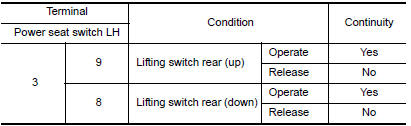
1. CHECK LIFTING SWITCH (REAR)
- Turn ignition switch OFF.
- Disconnect power seat switch LH.
- Check continuity between power seat switch LH terminals.
 Lifting switch (front)
Description
Lifting switch (front) is equipped to the power seat switch LH on the seat
frame. The operation signal is input to the driver seat control unit when the
lifting switch (front) is oper ...
 Tilt switch
Description
ADP steering switch (tilt switch) is equipped to the steering column. The
operation signal is input to the automatic drive positioner control unit when
the tilt switch is operated.
C ...
Other materials:
Rear disc brake
Disassembly and Assembly
Union bolt
Brake hose
Copper sealing washer
Cap
Bleed valve
Lower sliding pin bolt
Upper sliding pin bolt
Bushing
Cylinder body
Piston seal
Piston
Piston boot
Retaining ring
Sliding pin boot
Torque member bolt
Washer
Torque m ...
HVAC branch line circuit
Diagnosis Procedure
1.CHECK CONNECTOR
Turn the ignition switch OFF.
Disconnect the battery cable from the negative terminal.
Check the terminals and connectors of the A/C auto amp. for
damage, bend and loose connection (unit
side and connector side).
2.CHECK HARNESS FOR OPEN CIRCUI ...
B1134 - B1137 side airbag module LH
Description
DTC B1134 - B1137 FRONT LH SIDE AIR BAG MODULE
The front LH side air bag module is wired to the air bag diagnosis sensor
unit. The air bag diagnosis sensorunit will monitor for opens and shorts in
detected lines to the front LH side air bag module.
PART LOCATION
DTC Logic
DTC DE ...
Nissan Maxima Owners Manual
- Illustrated table of contents
- Safety-Seats, seat belts and supplemental restraint system
- Instruments and controls
- Pre-driving checks and adjustments
- Monitor, climate, audio, phone and voice recognition systems
- Starting and driving
- In case of emergency
- Appearance and care
- Do-it-yourself
- Maintenance and schedules
- Technical and consumer information
Nissan Maxima Service and Repair Manual

0.0318