
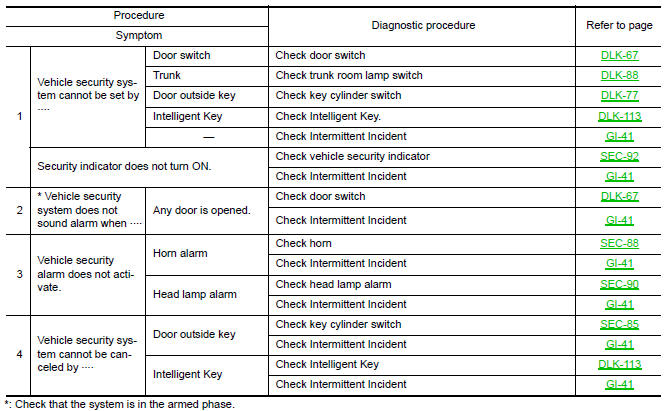
Nissan Maxima Service and Repair Manual: Vehicle security system symptoms
Symptom Table
 Intelligent key system/engine start function symptoms
Symptom Table
Engine cannot be started with all Intelligent Keys.
CAUTION:
Follow Trouble Diagnosis Flowchart
referring to "SEC-4, "Work Flow"". Determine malfunctioning
condition befor ...
 NISSAN vehicle immobilizer system-nats symptoms
Symptom Table
Security indicator does not turn ON or flash.
CAUTION:
Follow Trouble Diagnosis Flowchart
referring to "SEC-4, "Work Flow"". Determine malfunctioning
condition befor ...
Other materials:
RGB synchronizing signal circuit
Description
Transmit the RGB synchronizing signal to the display unit so as to
synchronize the RGB image displayed with AV control unit.
Diagnosis Procedure
1.CHECK CONTINUITY RGB SYNCHRONIZING SIGNAL CIRCUIT
Turn ignition switch OFF.
Disconnect display unit connector M141 and AV con ...
Sound signal circuit
SATELLITE RADIO TUNER
SATELLITE RADIO TUNER : Description
Left and right channel audio signals are supplied from the satellite radio
tuner to the AV control unit through the sound signal circuits.
SATELLITE RADIO TUNER : Diagnosis Procedure
LEFT CHANNEL
1.CHECK HARNESS
Turn ignition swi ...
Front door speaker
Removal and Installation
REMOVAL
Remove the front door finisher. Refer to INT-18, "Removal and
Installation".
Remove the front door speaker screws (A).
Disconnect the harness connector from the front door speaker
(1) and remove.
Remove the front door speaker spacer screws ...
Nissan Maxima Owners Manual
- Illustrated table of contents
- Safety-Seats, seat belts and supplemental restraint system
- Instruments and controls
- Pre-driving checks and adjustments
- Monitor, climate, audio, phone and voice recognition systems
- Starting and driving
- In case of emergency
- Appearance and care
- Do-it-yourself
- Maintenance and schedules
- Technical and consumer information
Nissan Maxima Service and Repair Manual

0.0083