
Nissan Maxima Service and Repair Manual: Sunshade
Exploded View
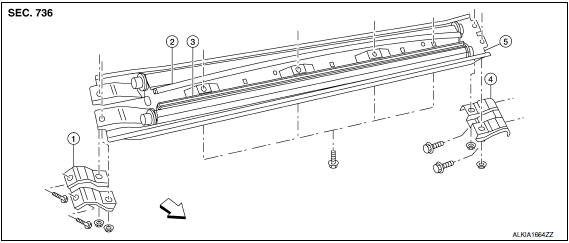
- Center bracket (RH)
- Rear sunshade
- Front sunshade
- Center bracket (LH)
- Sunshade carrier assembly
 Front
Front
Removal and Installation
REMOVAL
- Open glass lid and sunshades.
- Remove the headlining. Refer to INT-33, "Removal and Installation".
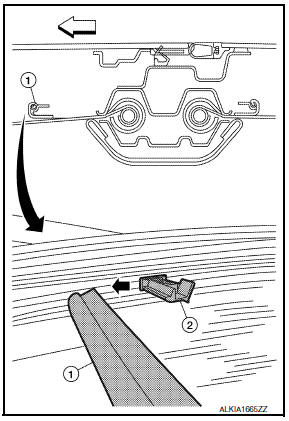
- Release front sunshade rail (1) from sunshade drive post (2).
: Front - Repeat sunshade drive post release for the rear sunshade.
- Remove side curtain air bag module bolts (two on each (LH/RH) sides) for access.
- Release harness clips from sunshade carrier assembly.
- Remove the center bracket nuts and bolts, then remove the center brackets (LH/RH).
- Remove the sunshade carrier assembly bolts, then lower sunshade and remove from vehicle.
- Release the end key slot from the sunshades.
INSTALLATION
CAUTION: Be careful not to release the spring when installing the sunshade.
- Wind the shade around the core post.
- Insert the round end of the shade (front - black curved rail) into the sunshade carrier assembly.
- Using a suitable tool, wind the double-D tang end 20 turns counter-clockwise (when viewed from the end).
- Insert the double-d tang end into the slot and lock it into the carrier.
- Position the sunshade carrier assembly and install the bolts.
- Position the center brackets (LH/RH) and install the bolts and nuts.
- Install the side curtain air bag module bolts.
- Install the headliner.
 Wind deflector
Removal and Installation
REMOVAL
Open the glass lid.
Remove the side screw (A) to release the wind deflector side
arms (1). : Front
Disconnect and release the inner blind (1) slide c ...
 Sunroof switch
Removal and Installation
The sunroof switch (1) is an integrated part of the front room/map lamp
(2), and therefore serviced as an assembly. For front room/map lamp removal
and installation pro ...
Other materials:
Communication signal circuit
Description
Detects door open/close condition.
Diagnosis Procedure
1.CHECK FRONT DOOR SWITCH INPUT SIGNAL
Turn ignition switch OFF.
Disconnect sunshade motor assembly connector.
Turn ignition switch ON.
Check signal between sunshade motor assembly harness connector and
ground with os ...
Auto light system
Wiring Diagram
...
Main line between adp and dlc circuit
Diagnosis Procedure
1.CHECK CONNECTOR
Turn the ignition switch OFF.
Disconnect the battery cable from the negative
terminal.
Check the following terminals and connectors for
damage, bend and loose connection (connector side
and harness side).
Harness connec ...
Nissan Maxima Owners Manual
- Illustrated table of contents
- Safety-Seats, seat belts and supplemental restraint system
- Instruments and controls
- Pre-driving checks and adjustments
- Monitor, climate, audio, phone and voice recognition systems
- Starting and driving
- In case of emergency
- Appearance and care
- Do-it-yourself
- Maintenance and schedules
- Technical and consumer information
Nissan Maxima Service and Repair Manual

0.0164