
Nissan Maxima Service and Repair Manual: Fender protector
Exploded View
Front
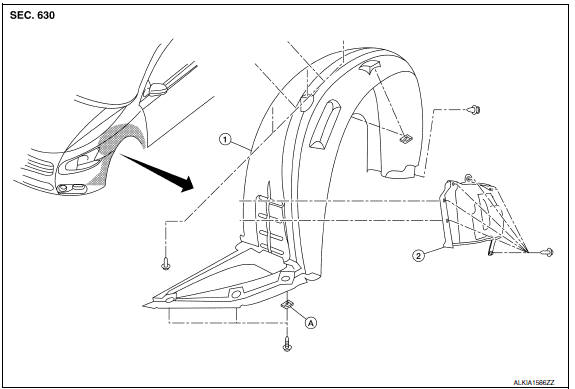
- Front fender protector
- Front fender protector side cover
- J-clip
Rear
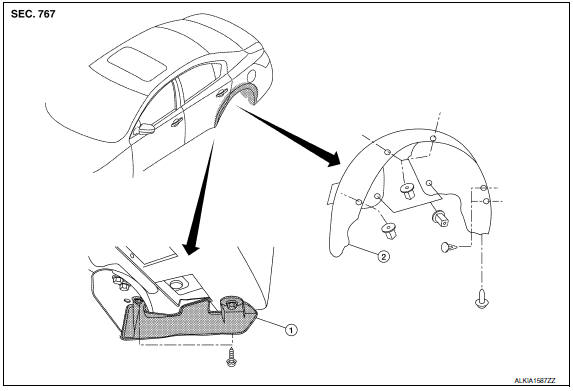
- Rear wind deflector
- Rear fender protector
Removal and Installation
FRONT FENDER PROTECTOR
Removal
NOTE: Position front tires as necessary to remove the front fender protectors.
- Remove the front screw from center mudguard.
- Remove the front fender protector side cover clips, then remove front fender protector side cover.
- Remove the front fender protector screws and clips, then remove front fender protector.
Installation
Installation is in the reverse order of removal.
NOTE: Position front tires as necessary to install the front fender protectors.
REAR FENDER PROTECTOR
Removal
- Remove the rear tire/wheel assembly. Refer to WT-60, "Adjustment".
- Remove the rear fender protector screws and clips.
- Remove the fender protector.
- Remove the wind deflector screws, then remove the wind deflector.
Installation
Installation is in the reverse order of removal.
 Cowl top
Exploded View
Cowl top side trim cover (RH)
Cowl top grille
Lower cowl top extension brace
Lower cowl top extension (RH)
Lower cowl top extension seal (RH)
Lower cowl top extension ...
 Mudguard
Exploded View
Mudguard
Clip C205
Clip CF118
Front
Removal and Installation
REMOVAL
Remove the clips located on the underbody.
Remove the center mudguard front and rear screws ...
Other materials:
Symptom diagnosis
SQUEAK AND RATTLE TROUBLE DIAGNOSES
Work Flow
CUSTOMER INTERVIEW
Interview the customer if possible, to determine the conditions that exist
when the noise occurs. Use the Diagnostic Worksheet during the interview to
document the facts and conditions when the noise occurs and any customer' ...
System temporarily unavailable
When radar blockage is detected, the system will
be deactivated automatically. The "Side Radar
Obstruction" warning message will appear and
the BSW/RCTA indicator (white) will blink A in
the vehicle information display.
The systems are not available until the conditions
no longer exist.
...
Inspection and adjustment
Preliminary Check
NOTE: The Signal Tech II Tool (J-50190) can be used
to perform the following functions. Refer to the Signal Tech II User Guide
for additional information.
Activate and display TPMS transmitter IDs
Display tire pressure reported by the TPMS transmitter
...
Nissan Maxima Owners Manual
- Illustrated table of contents
- Safety-Seats, seat belts and supplemental restraint system
- Instruments and controls
- Pre-driving checks and adjustments
- Monitor, climate, audio, phone and voice recognition systems
- Starting and driving
- In case of emergency
- Appearance and care
- Do-it-yourself
- Maintenance and schedules
- Technical and consumer information
Nissan Maxima Service and Repair Manual

0.0114