
Nissan Maxima Service and Repair Manual: How to use this manual
HOW TO USE THIS SECTION
Caution
- This section describes information peculiar to a vehicle and inspection procedures.
- For trouble diagnosis procedure, refer to LAN-15, "Trouble Diagnosis Procedure".
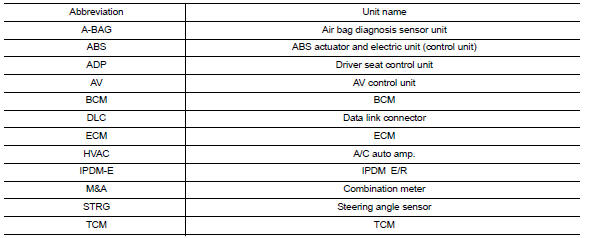
Abbreviation List
Unit name abbreviations in CONSULT CAN diagnosis and in this section are as per the following list.
 Basic inspection
DIAGNOSIS AND REPAIR WORKFLOW
Trouble Diagnosis Flow Chart
Trouble Diagnosis Procedure
INTERVIEW WITH CUSTOMER
Interview with the customer is important to detect the root cause of CAN
communi ...
 Precaution
PRECAUTIONS
Precaution for Supplemental Restraint System (SRS) "AIR BAG" and "SEAT BELT
PRE-TENSIONER"
The Supplemental Restraint System such as "AIR BAG" and "SEAT BELT
PRE-TENSIONER", used alo ...
Other materials:
Power supply and ground circuit
AUDIO UNIT
AUDIO UNIT : Diagnosis Procedure
1.CHECK FUSES
2.POWER SUPPLY CIRCUIT CHECK
Disconnect audio unit connector M132.
Check voltage between the audio unit connector M132 and ground.
3.GROUND CIRCUIT CHECK
Inspect audio unit case ground.
DISPLAY UNIT
DISPLAY UNIT : Dia ...
Key cylinder switch
Description
The main power window and door lock/unlock switch detects condition of the
door key cylinder switch and
transmits to BCM as the LOCK or UNLOCK signal.
Component Function Check
1. CHECK DOOR KEY CYLINDER SWITCH INPUT SIGNAL
Check KEY CYL UN-SW, KEY CYL UN-SW in "DATA MONITOR" mod ...
Battery saver output/power supply circuit
Description
Provides the interior room lamp power supply. Also cuts the power supply when
the interior room lamp battery saver is activated.
Component Function Check
1.CHECK BATTERY SAVER OUTPUT/POWER SUPPLY FUNCTION
CONSULT
Turn ignition switch ON.
Turn each interior room lamp ON.
...
Nissan Maxima Owners Manual
- Illustrated table of contents
- Safety-Seats, seat belts and supplemental restraint system
- Instruments and controls
- Pre-driving checks and adjustments
- Monitor, climate, audio, phone and voice recognition systems
- Starting and driving
- In case of emergency
- Appearance and care
- Do-it-yourself
- Maintenance and schedules
- Technical and consumer information
Nissan Maxima Service and Repair Manual

0.0079