
Nissan Maxima Service and Repair Manual: Signal buffer system
System Diagram
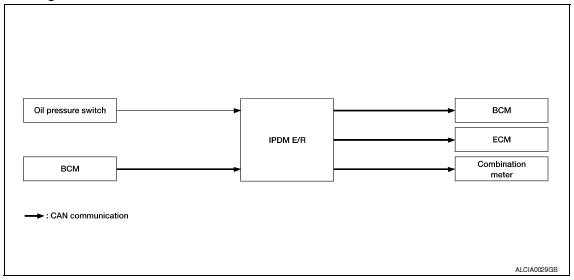
System Description
- IPDM E/R reads the status of the oil pressure switch and transmits the oil pressure switch signal to BCM via CAN communication.
- IPDM E/R receives the rear window defogger status signal from BCM via CAN communication and transmits it to ECM via CAN communication.
 Power control system
System Diagram
System Description
COOLING FAN CONTROL
IPDM E/R controls cooling fans according to the status of the cooling fan
speed request signal received from
ECM via CAN communication ...
 Power consumption control system
System Diagram
System Description
OUTLINE
IPDM E/R incorporates a power consumption control function that
reduces the power consumption according
to the vehicle status.
IPDM E/R chan ...
Other materials:
Can communication system
System Description
CAN (Controller Area Network) is a serial communication line for real time
application. It is an on-vehicle multiplex
communication line with high data communication speed and excellent error
detection ability. Many electronic
control units are equipped onto each vehicle, a ...
U1244 GPS antenna
DTC Logic
Diagnosis Procedure
1.GPS ANTENNA CHECK
Inspect GPS antenna and antenna feeder for damage or poor connection.
2.CHECK AV CONTROL UNIT VOLTAGE
Turn ignition switch ON.
Check voltage between AV control unit connector M165 terminal
105 and ground.
...
Basic inspection
DIAGNOSIS AND REPAIR WORKFLOW
Work Flow
OVERALL SEQUENCE
DETAILED FLOW
1.CONFIRM SYMPTOM
Confirm symptom or customer complaint.
2.CHECK SELF-DIAGNOSIS OPERATION OF COMBINATION METER
Perform self-diagnosis of combination meter. Refer to MWI-29, "Diagnosis
Description".
3.CHECK COMBINATION ...
Nissan Maxima Owners Manual
- Illustrated table of contents
- Safety-Seats, seat belts and supplemental restraint system
- Instruments and controls
- Pre-driving checks and adjustments
- Monitor, climate, audio, phone and voice recognition systems
- Starting and driving
- In case of emergency
- Appearance and care
- Do-it-yourself
- Maintenance and schedules
- Technical and consumer information
Nissan Maxima Service and Repair Manual

0.0085