
Nissan Maxima Service and Repair Manual: Basic inspection
DIAGNOSIS AND REPAIR WORKFLOW
Work Flow
OVERALL SEQUENCE
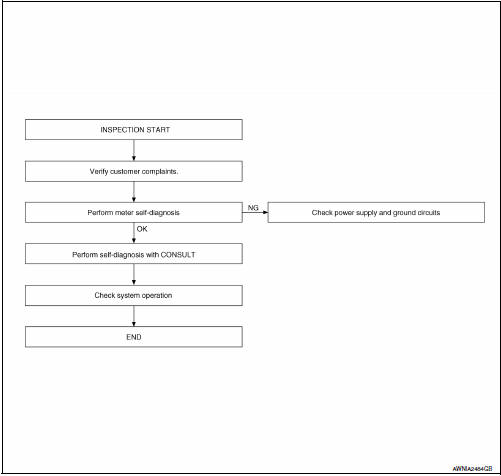
DETAILED FLOW
1.CONFIRM SYMPTOM
Confirm symptom or customer complaint.
2.CHECK SELF-DIAGNOSIS OPERATION OF COMBINATION METER
Perform self-diagnosis of combination meter. Refer to MWI-29, "Diagnosis Description".
3.CHECK COMBINATION METER (CONSULT)
Select "METER/M&A" on CONSULT and perform "SELF-DIAGNOSIS" of combination meter. Refer to MWI- 29, "CONSULT Function (METER/M&A)".
4.CONFIRM OPERATION


Other materials:
Periodic maintenance
FUEL SYSTEM
Inspection
Inspect fuel lines, fuel filler cap and fuel tank for improper attachment,
leaks, cracks, damage, loose connections, chafing or deterioration.
If
necessary, repair or replace damaged parts.
Quick Connector
CAUTION:
After connecting fuel tube quick connec ...
In-vehicle sensor
Removal and Installation
REMOVAL
Remove the instrument lower panel LH. Refer to IP-19, "Removal and
Installation".
Remove the in-vehicle sensor screw and the in-vehicle sensor.
INSTALLATION
Installation is in the reverse order of removal.
CAUTION:
Make sure that the asp ...
Tel antenna
Removal and Installation
REMOVAL
Disconnect the battery negative terminal. Refer to PG-67, "Removal
and Installation (Battery)".
Remove the rear parcel shelf finisher. Refer to INT-28, "Removal
and Installation".
Remove the Bluetooth antenna screw (A).
Detach the Bluetooth antenna ...
Nissan Maxima Owners Manual
- Illustrated table of contents
- Safety-Seats, seat belts and supplemental restraint system
- Instruments and controls
- Pre-driving checks and adjustments
- Monitor, climate, audio, phone and voice recognition systems
- Starting and driving
- In case of emergency
- Appearance and care
- Do-it-yourself
- Maintenance and schedules
- Technical and consumer information
Nissan Maxima Service and Repair Manual

0.0118