
Nissan Maxima Service and Repair Manual: Audio unit
Reference Value
TERMINAL LAYOUT
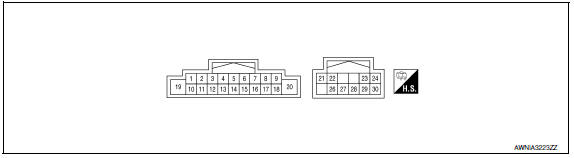
PHYSICAL VALUES
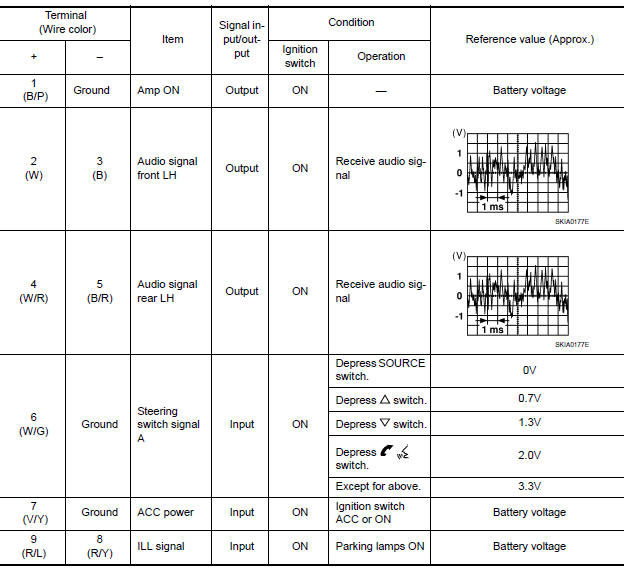
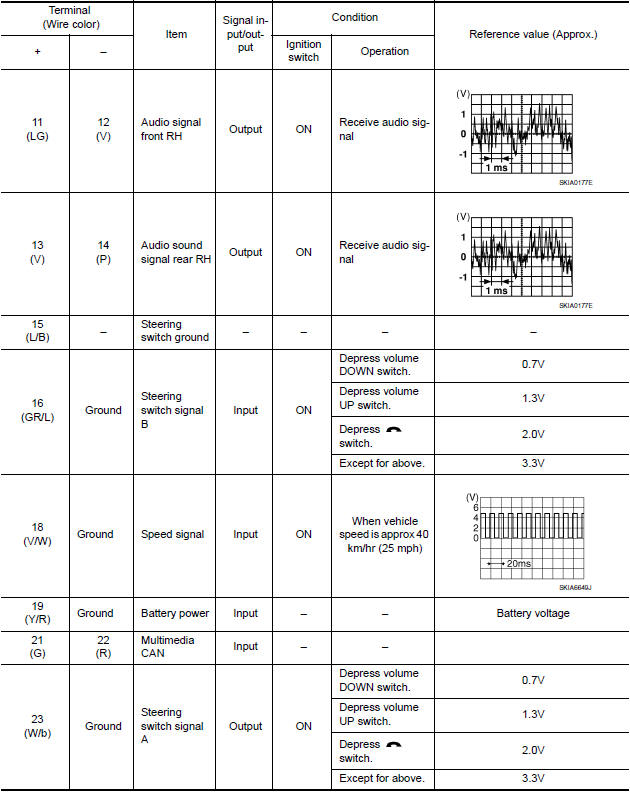
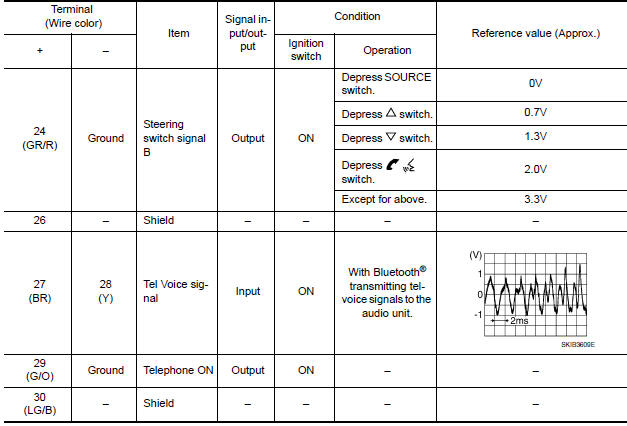

 Display unit
Reference Values
TERMINAL LAYOUT
PHYSICAL VALUES
...
Other materials:
P0462, P0463 fuel level sensor
Description
The fuel level sensor is mounted in the fuel level sensor unit.
The sensor detects a fuel level in the fuel tank and transmits a signal to the
combination meter. The combination
meter sends the fuel level sensor signal to the ECM via the CAN communication
line.
It consists o ...
Hood
HOOD ASSEMBLY
HOOD ASSEMBLY : Exploded View
Hood hinge cover (LH)
Hood stay (LH)
Hood hinge (LH)
Hood assembly
Hood bumper rubber
Seal
Hood insulator
Hood insulator clips
HOOD ASSEMBLY : Removal and Installation
CAUTION:
Use two people when removing or installi ...
P0128 thermostat function
DTC Logic
DTC DETECTION LOGIC
NOTE:
If DTC P0128 is displayed with DTC P0300, P0301, P0302, P0303, P0304, P0305 or
P0306, first perform
the trouble diagnosis for DTC P0300, P0301, P0302, P0303, P0304, P0305, P0306.
Engine coolant temperature has not risen enough to open the thermostat even ...
Nissan Maxima Owners Manual
- Illustrated table of contents
- Safety-Seats, seat belts and supplemental restraint system
- Instruments and controls
- Pre-driving checks and adjustments
- Monitor, climate, audio, phone and voice recognition systems
- Starting and driving
- In case of emergency
- Appearance and care
- Do-it-yourself
- Maintenance and schedules
- Technical and consumer information
Nissan Maxima Service and Repair Manual

0.0178