
Nissan Maxima Service and Repair Manual: Display unit
Reference Values
TERMINAL LAYOUT
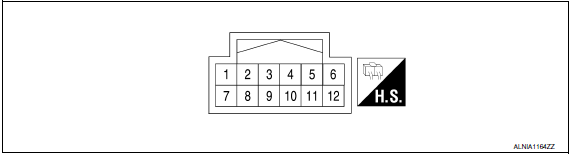
PHYSICAL VALUES
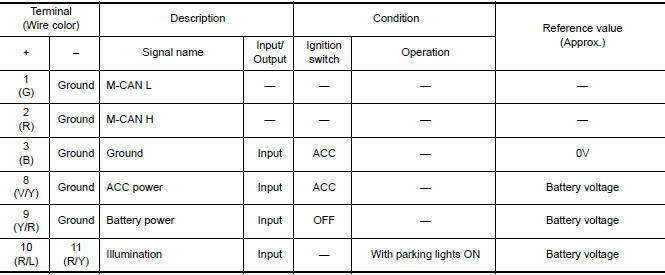
 Audio unit
Reference Value
TERMINAL LAYOUT
PHYSICAL VALUES
...
 Bose speaker AMP
Reference Values
TERMINAL LAYOUT
PHYSICAL VALUES
...
Other materials:
System malfunction
If the PFCW system malfunctions, it will be
turned off automatically, a chime will sound, the
FEB system warning light (orange) will illuminate
and the warning message [Malfunction] will appear
in the vehicle information display.
Action to take
If the warning light (orange) comes on, stop the
...
P1705 TP sensor
Description
The electric throttle control actuator consists of
throttle control motor, accelerator pedal position sensor, throttle
position sensor, etc. The actuator sends a signal to the ECM, and ECM sends the
signal to TCM via CAN
communication.
DTC Logic
DTC DETECTION LOGIC
DTC CONF ...
RGB AREA (YS) signal circuit
Description
Transmits the display area of RGB image displayed by AV control unit with RGB
area (YS) signal to display unit.
Diagnosis Procedure
1.CHECK CONTINUITY RGB AREA (YS) SIGNAL CIRCUIT
Turn ignition switch OFF.
Disconnect display unit connector M141 and AV control unit
conne ...
Nissan Maxima Owners Manual
- Illustrated table of contents
- Safety-Seats, seat belts and supplemental restraint system
- Instruments and controls
- Pre-driving checks and adjustments
- Monitor, climate, audio, phone and voice recognition systems
- Starting and driving
- In case of emergency
- Appearance and care
- Do-it-yourself
- Maintenance and schedules
- Technical and consumer information
Nissan Maxima Service and Repair Manual

0.0072