
Nissan Maxima Service and Repair Manual: Rear door speaker
Removal and Installation
REMOVAL
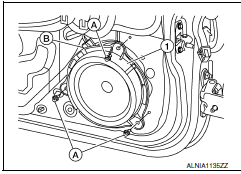
- Remove the rear door finisher. Refer to INT-21, "Removal and Installation".
- Remove the rear door speaker screws (A).
- Disconnect the harness connector (B) from the rear door speaker (1) and remove.
INSTALLATION
Installation is in the reverse order of removal.
 Front door speaker
Removal and Installation
REMOVAL
Remove the front door finisher. Refer to INT-18, "Removal and
Installation".
Remove the front door speaker screws (A).
Disconnect the harness connector f ...
 Subwoofer
Removal and Installation
Subwoofer (LH)
Subwoofer (RH)
Subwoofer screws
Subwoofer connectors
REMOVAL
Remove the rear parcel shelf finisher. Refer to INT-28, "Removal ...
Other materials:
Service data and specifications (SDS)
General Specification (Rear)
Wheel Alignment (Unladen*1)
*1: Fuel, engine coolant, and lubricants are full. Spare tire, jack, hand
tools, and mats are in designated positions. *2: 18" tire. *3: 19"
tire.
Ball Joint
Wheelarch Height (Unladen*1)
*1: Fuel, engine coolant, and lub ...
Navigation System
Turn-by-turn route guidance can be displayed on
the vehicle information display.
To view turn-by-turn route guidance on the vehicle
information display, use or
and
scroll to on the vehicle
information display
menu.
City view
City view shows representation of intersections
with ...
System description
AUTOMATIC AIR CONDITIONER SYSTEM
WITH COLOR DISPLAY
WITH COLOR DISPLAY : Switches And Their Control F
WITH COLOR DISPLAY : Discharge Air Flow
WITH MONOCHROME DISPLAY
WITH MONOCHROME DISPLAY : Switches And Their Control Function
WITH MONOCHROME DISPLAY : Discharge Air Flow
...
Nissan Maxima Owners Manual
- Illustrated table of contents
- Safety-Seats, seat belts and supplemental restraint system
- Instruments and controls
- Pre-driving checks and adjustments
- Monitor, climate, audio, phone and voice recognition systems
- Starting and driving
- In case of emergency
- Appearance and care
- Do-it-yourself
- Maintenance and schedules
- Technical and consumer information
Nissan Maxima Service and Repair Manual

0.0099