
Nissan Maxima Service and Repair Manual: Bluetooth control unit
Removal and Installation
REMOVAL
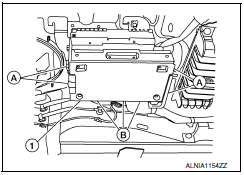
- Disconnect the battery negative terminal. Refer to PG-67, "Removal and Installation (Battery)".
- Remove the trunk upper finisher. Refer to INT-23, "Exploded View".
- Remove the parcel shelf finisher. Refer to INT-28, "Removal and Installation".
- From inside the passenger compartment, remove the bracket screws and lower the assembly for access.
- Remove the Bluetooth control unit screws (A).
- Disconnect the harness connector (B) from the Bluetooth control unit and remove.
INSTALLATION
Installation is in the reverse order of removal.
 Tel antenna
Removal and Installation
REMOVAL
Disconnect the battery negative terminal. Refer to PG-67, "Removal
and Installation (Battery)".
Remove the rear parcel shelf finisher. Refer to INT-28, "Re ...
 Basic inspection
...
Other materials:
Precaution
PRECAUTIONS
Precaution for Supplemental Restraint System (SRS) "AIR BAG" and "SEAT
BELT
PRE-TENSIONER"
The Supplemental Restraint System such as "AIR BAG" and "SEAT BELT PRE-TENSIONER",
used along
with a front seat belt, helps to reduce the risk or severity of injury to ...
Indicator lights
For additional information, refer to "Vehicle information
display" in this section.
Front fog light indicator
light
(green)
The front fog light indicator light illuminates when
the front fog lights are on. For additional information,
refer to "Fog light switch" in this section.
Front passen ...
How to park with predicted course lines
WARNING
If the tires are replaced with different
sized tires, the predicted course lines
may be displayed incorrectly.
On a snow-covered or slippery road,
there may be a difference between the
predicted course line and the actual
course line.
If the battery is disconnected or becomes
discha ...
Nissan Maxima Owners Manual
- Illustrated table of contents
- Safety-Seats, seat belts and supplemental restraint system
- Instruments and controls
- Pre-driving checks and adjustments
- Monitor, climate, audio, phone and voice recognition systems
- Starting and driving
- In case of emergency
- Appearance and care
- Do-it-yourself
- Maintenance and schedules
- Technical and consumer information
Nissan Maxima Service and Repair Manual

0.0097