
Nissan Maxima Service and Repair Manual: Tel antenna
Removal and Installation
REMOVAL
- Disconnect the battery negative terminal. Refer to PG-67, "Removal and Installation (Battery)".
- Remove the rear parcel shelf finisher. Refer to INT-28, "Removal and Installation".
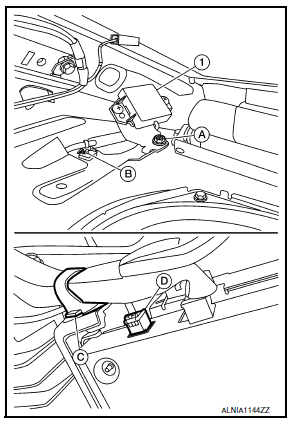
- Remove the Bluetooth antenna screw (A).
- Detach the Bluetooth antenna harness clip (B).
- Fold down the rear seat (if equipped) or open the trunk lid, then detach the Bluetooth antenna harness clip (C).
- Disconnect the harness connector (D) from the Bluetooth antenna (1) and remove.
INSTALLATION
Installation is in the reverse order of removal.
 Microphone
Removal and Installation
REMOVAL
Remove the front room/map lamp assembly. Refer to INL-84, "Removal
and Installation".
Detach the microphone connector (A).
Remove the fro ...
 Bluetooth control unit
Removal and Installation
REMOVAL
Disconnect the battery negative terminal. Refer to PG-67, "Removal
and Installation (Battery)".
Remove the trunk upper finisher. Refer to INT-36, & ...
Other materials:
Audio antenna
Location of Antenna
AV control unit
AV control unit antenna feeder
In-line connectors M103, M501
Antenna amp.
Window antenna
Satellite radio antenna feeder
Satellite radio antenna
Window Antenna Repair
ELEMENT CHECK
Attach probe circuit tester (ohm setting) to antenna ...
ABS
System Diagram
System Description
Anti-Lock Braking System is a function that detects wheel revolution
while braking, electronically controls
braking force, and prevents wheel locking during sudden braking. It improves
handling stability and maneuverability
for avoiding obstacle ...
Trunk release solenoid
Description
Performs trunk lid open with signal from BCM.
Component Function Check
1. CHECK TRUNK LID OPENER CANCEL SWITCH
Check trunk lid opener cancel switch position.
2. CHECK FUNCTION
Perform Active Test TRUNK/GLASS HATCH with CONSULT.
Touch "OPEN" and check that trunk lid opens
...
Nissan Maxima Owners Manual
- Illustrated table of contents
- Safety-Seats, seat belts and supplemental restraint system
- Instruments and controls
- Pre-driving checks and adjustments
- Monitor, climate, audio, phone and voice recognition systems
- Starting and driving
- In case of emergency
- Appearance and care
- Do-it-yourself
- Maintenance and schedules
- Technical and consumer information
Nissan Maxima Service and Repair Manual

0.0087