
Nissan Maxima Owners Manual: PFCW system operation
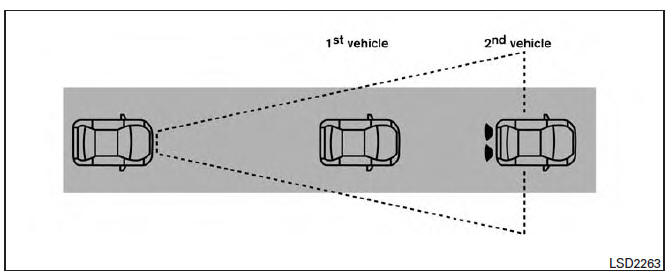
The PFCW system operates at speeds above approximately 3 mph (5 km/h).
If there is a potential risk of a forward collision, the PFCW system will warn the driver by blinking the vehicle ahead detection indicator, and sounding an audible alert.
 Predictive Forward Collision Warning (PFCW) (if so equipped)
WARNING
Failure to follow the warnings and instructions
for proper use of the PFCW system
could result in serious injury or death.
The PFCW system can help warn the
driver before a collision ...
 Turning the PFCW system on/off
Perform the following steps to turn the PFCW
system ON or OFF.
1. Press the button until
"Settings" displays
in the vehicle information display and
then press OK button. Use the but ...
Other materials:
Lifting sensor (front)
Description
The lifting sensor (front) is installed to the seat frame.
The pulse signal is input to the driver seat control unit when the
lifting (front) is operated.
The driver seat control unit counts the pulse and calculates the lifting
(front) amount of the seat.
Component Funct ...
Multi AV system symptoms
Symptom Table
RELATED TO NAVIGATION
Trouble Diagnosis Chart by Symptom
RELATED TO HANDS-FREE PHONE
Before performing diagnosis, confirm that the cellular phone being
used by the customer is compatible with
the vehicle.
It is possible that a malfunction is occurring due to a versio ...
P0455 evap control system
DTC Logic
DTC DETECTION LOGIC
This diagnosis detects a very large leakage (fuel filler cap fell off etc.)
in EVAP system between the fuel tank
and EVAP canister purge volume control solenoid valve.
CAUTION:
Use only a genuine NISSAN fuel filler cap as a replacement. If
an ...
Nissan Maxima Owners Manual
- Illustrated table of contents
- Safety-Seats, seat belts and supplemental restraint system
- Instruments and controls
- Pre-driving checks and adjustments
- Monitor, climate, audio, phone and voice recognition systems
- Starting and driving
- In case of emergency
- Appearance and care
- Do-it-yourself
- Maintenance and schedules
- Technical and consumer information
Nissan Maxima Service and Repair Manual

0.0135