
Nissan Maxima Owners Manual: Rear-facing child restraint installation using the seat belts
WARNING
The three-point seat belt with Automatic Locking Retractor (ALR) must be used when installing a child restraint. Failure to use the ALR mode will result in the child restraint not being properly secured. The restraint could tip over or be loose and cause injury to a child in a sudden stop or collision
For additional information, refer to all Warnings and Cautions in the "Child safety" and "Child restraints" sections of this manual before installing a child restraint.
Do not use the lower anchors if the combined weight of the child and the child restraint exceeds 65 lbs (29.5 kg). If the combined weight of the child and the child restraint is greater than 65 lbs (29.5 kg), use the vehicle's seat belt (not the lower anchors) to install the child restraint. Be sure to follow the child restraint manufacturer's instructions for installation.
Follow these steps to install a rear-facing child restraint using the vehicle seat belts in the rear seats:
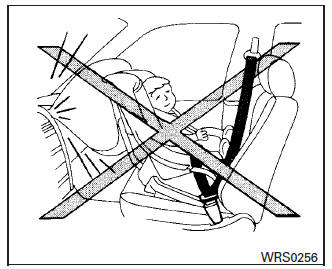
Rear-facing - step 1
1. Child restraints for infants must be used in the rear-facing direction and therefore must not be used in the front seat. Position the child restraint on the seat.
Always follow the child restraint manufacturer's instructions.
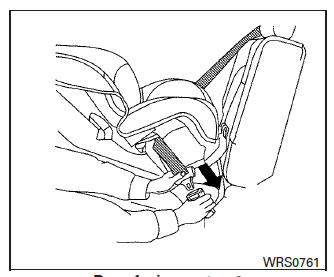
Rear-facing - step 2
2. Route the seat belt tongue through the child restraint and insert it into the buckle until you hear and feel the latch engage. Be sure to follow the child restraint manufacturer's instructions for belt routing.
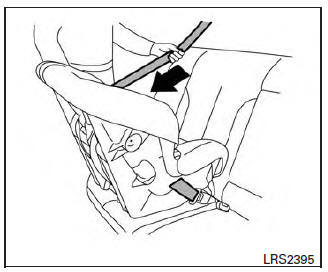
Rear-facing - step 3
3. Pull the shoulder belt until the belt is fully extended. At this time, the seat belt retractor is in the ALR mode (child restraint mode). It reverts to the ELR mode when the seat belt is fully retracted.
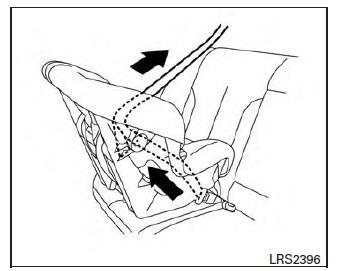
Rear-facing - step 4
4. Allow the seat belt to retract. Pull up on the shoulder belt to remove any slack in the belt.
Rear-facing - step 5
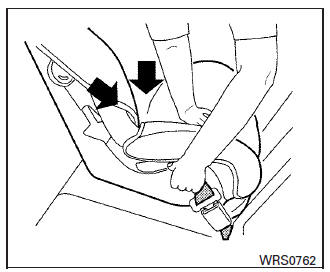
5. Remove any additional slack from the seat belt; press downward and rearward firmly in the center of the child restraint to compress the vehicle seat cushion and seatback while pulling up on the seat belt.
Rear-facing - step 6
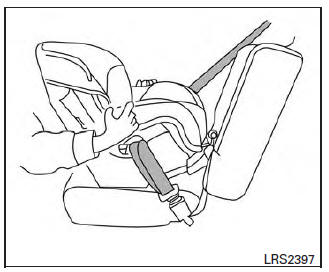
6. After attaching the child restraint, test it before you place the child in it. Push it from side to side while holding the child restraint near the seat belt path. The child restraint should not move more than 1 inch (25 mm), from side to side. Try to tug it forward and check to see if the belt holds the restraint in place.
If the restraint is not secure, tighten the seat belt as necessary, or put the restraint in another seat and test it again. You may need to try a different child restraint. Not all child restraints fit in all types of vehicles.
7. Check to make sure that the child restraint is properly secured prior to each use. If the seat belt is not locked, repeat steps 1 through 6.
After the child restraint is removed and the seat belt fully retracted, the ALR mode (child restraint mode) is canceled.
 Rear-facing child restraint installation using LATCH
For additional information, refer to all Warnings
and Cautions in the "Child safety" and "Child
restraints" sections of this manual before installing
a child restraint.
Do not use the lower anch ...
 Forward-facing child restraint installation using LATCH
For additional information, refer to all Warnings
and Cautions in the "Child safety" and "Child
restraints" sections of this manual before installing
a child restraint.
Do not use the lower anch ...
Other materials:
Operating range
The Intelligent Key functions can only be used
when the Intelligent Key is within the specified
operating range.
When the Intelligent Key battery is almost discharged
or strong radio waves are present near
the operating location, the Intelligent Key system's
operating range becomes narro ...
Microphone signal circuit
Description
Voice signals are transmitted from the microphone to the Bluetooth control
unit using the microphone signal circuits.
Diagnosis Procedure
1.CHECK HARNESS BETWEEN BLUETOOTH CONTROL UNIT AND MICROPHONE
Turn ignition switch OFF.
Disconnect Bluetooth control unit connector and ...
Programming trouble-diagnosis
If the HomeLink does not quickly learn the
hand-held transmitter information:
replace the hand-held transmitter batteries
with new batteries.
position the hand-held transmitter with its
battery area facing away from the
HomeLink surface.
press and hold both the HomeLink and
hand-hel ...
Nissan Maxima Owners Manual
- Illustrated table of contents
- Safety-Seats, seat belts and supplemental restraint system
- Instruments and controls
- Pre-driving checks and adjustments
- Monitor, climate, audio, phone and voice recognition systems
- Starting and driving
- In case of emergency
- Appearance and care
- Do-it-yourself
- Maintenance and schedules
- Technical and consumer information
Nissan Maxima Service and Repair Manual

0.0117