
Nissan Maxima Owners Manual: Drive belt
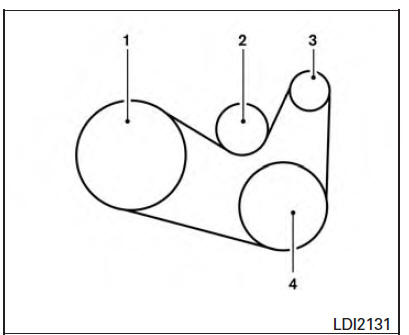
VQ35DE engine
1. Crankshaft pulley
2. Drive belt automatic tensioner pulley
3. Generator pulley
4. Air conditioner compressor pulley
WARNING
Be sure the ignition switch is placed in the OFF or LOCK position before servicing drive belt. The engine could rotate unexpectedly.
1. Visually inspect the belt for signs of unusual wear, cuts, fraying or looseness. If the belt is in poor condition or is loose, have it replaced or adjusted. It is recommended that you visit a NISSAN dealer for this service.
2. Have the belt checked regularly for condition and tension in accordance with the maintenance schedule found in the "Maintenance and schedules" section of this manual.
 Variable voltage control system
CAUTION
Do not ground accessories directly to
the battery terminal. Doing so will bypass
the variable voltage control system
and the vehicle battery may not
charge completely.
Use el ...
 Spark plugs
Replacing spark plugs
Iridium-tipped spark plugs
It is not necessary to replace iridium-tipped A
spark plugs as frequently as conventional type
spark plugs because they last much longer. Follo ...
Other materials:
Can communication system
System Description
CAN communication is a multiplex communication system. This enables the
system to transmit and receive large quantities of data at high speed by connecting control units with two
communication lines (CAN-H and CAN-L).
Control units on the CAN network transmit signals usi ...
Subwoofer
Description
The AV control unit sends audio signals to the BOSE speaker amp. The BOSE
speaker amp. amplifies the
audio signals before sending them to the subwoofers using the audio signal
circuits.
Diagnosis Procedure
1.CONNECTOR CHECK
Check the AV control unit, BOSE speaker amp. and subwo ...
Service data and specifications (SDS)
SERVICE DATA AND SPECIFICATIONS (SDS)
General Specifications
Brake Pedal
Check Valve
Brake Booster
Front Disc Brake
Rear Disc Brake
...
Nissan Maxima Owners Manual
- Illustrated table of contents
- Safety-Seats, seat belts and supplemental restraint system
- Instruments and controls
- Pre-driving checks and adjustments
- Monitor, climate, audio, phone and voice recognition systems
- Starting and driving
- In case of emergency
- Appearance and care
- Do-it-yourself
- Maintenance and schedules
- Technical and consumer information
Nissan Maxima Service and Repair Manual

0.0089