
Nissan Maxima Service and Repair Manual: Cooling fan
Removal and Installation
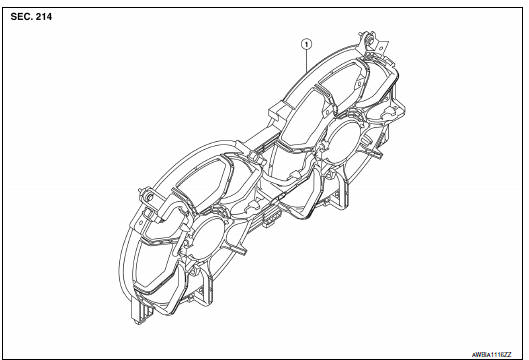
- Radiator cooling fan assembly
WARNING: Do not remove the radiator cap when the engine is hot. Serious burns could occur from high pressure coolant escaping from the radiator. Wrap a thick cloth around the radiator cap. Slowly turn it a quarter turn to allow built-up pressure to escape. Carefully remove the radiator cap by turning it all the way.
NOTE: When removing components such as hoses, tubes/lines, etc., cap or plug openings to prevent fluid from spilling.
REMOVAL
- Partially drain engine coolant from radiator. Refer to CO-11,
"Changing Engine Coolant".
CAUTION: Perform when engine is cold. - Remove engine room cover. Refer to EM-23, "Removal and Installation".
- Remove TCM. Refer to TM-168, "Removal and Installation".
- Remove battery tray. Refer to PG-68, "Removal and Installation (Battery Tray)".
- Disconnect radiator hose (upper).
- Disconnect the harness connectors from the radiator cooling fan motor.
- Remove radiator cooling fan assembly.
INSTALLATION
Installation is in the reverse order of removal.
- Radiator cooling fans are controlled by ECM. Refer to EC-486, "Description".
 Radiator
Exploded View
Radiator
CVT oil cooler hose
Radiator drain plug
Radiator hose (lower) clamp
Radiator hose (lower)
Radiator hose (lower) bracket
Reservoir tank
Reservoir hose ...
 Water pump
Exploded View
Water pump
O-rings
Timing chain tensioner
Intake valve timing control solenoid
valve cover (RH) (bank 1)
Water pump cover
Removal and Installation
WARNING:
Do no ...
Other materials:
Navigation Swipe to Meter
Turn-by-turn route guidance can also be viewed
in the vehicle information display by using Navigation
Swipe to Meter. This can be done by
programming a route, touching the turn-by-turn
route icon on the center display, and swiping
towards the general direction of the vehicle information
di ...
Forward Emergency Braking (FEB) (if so equipped)
WARNING
Failure to follow the warnings and instructions
for proper use of the FEB system
could result in serious injury or death.
The FEB system is a supplemental aid
to the driver. It is not a replacement for
the driver's attention to traffic conditions
or responsibility to drive safel ...
STRG branch line circuit
Diagnosis Procedure
1.CHECK CONNECTOR
Turn the ignition switch OFF.
Disconnect the battery cable from the negative terminal.
Check the terminals and connectors of the steering angle sensor
for damage, bend and loose connection
(unit side and connector side).
2.CHECK HARNESS FOR OPE ...
Nissan Maxima Owners Manual
- Illustrated table of contents
- Safety-Seats, seat belts and supplemental restraint system
- Instruments and controls
- Pre-driving checks and adjustments
- Monitor, climate, audio, phone and voice recognition systems
- Starting and driving
- In case of emergency
- Appearance and care
- Do-it-yourself
- Maintenance and schedules
- Technical and consumer information
Nissan Maxima Service and Repair Manual

0.0123