
Nissan Maxima Service and Repair Manual: Removal and installation
STARTER MOTOR
Removal and Installation
REMOVAL
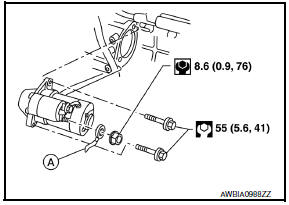
- Remove the battery tray. Refer to PG-68, "Removal and Installation (Battery Tray)".
- Disconnect the battery cable (A) and starter harness connector.
- Remove the starter bolts, then remove the starter
INSTALLATION
Installation is in the reverse order of removal.
- Reset electronic systems as necessary. Refer to PG-5, "ADDITIONAL SERVICE WHEN REMOVING BATTERY NEGATIVE TERMINAL : Special Repair Requirement".
CAUTION: Carefully tighten the battery cable nut.
 Preparation
Special Service Tool
The actual shapes of the tools may differ from those illustrated here.
Commercial Service Tools
...
 Service data and specifications (SDS)
STARTER MOTOR
Starter
*: Always check with the Parts Department for the latest parts information. ...
Other materials:
Variable induction air system
Description
Power Valves 1 and 2
The power valves 1 and 2 are installed in intake manifold collector and used to
control the suction passage of
the variable induction air control system. They are set in the fully closed or
fully opened position by the power
valve actuators 1 and 2 operate ...
General maintenance
During the normal day-to-day operation of the
vehicle, general maintenance should be performed
regularly as prescribed in this section. If
you detect any unusual sounds, vibrations or
smells, be sure to check for the cause or have a
NISSAN dealer do it promptly. In addition, it is
recommended ...
Brake master cylinder
Exploded View
Reservoir cap
Oil strainer (blue)
Master cylinder assembly
Brake fluid level switch harness connector
O-ring
PBC (Poly Butyl Cuprysil) grease or
silicone-based grease
Removal and Installation
CAUTION:
Do not to splash brake fluid on painted areas; ...
Nissan Maxima Owners Manual
- Illustrated table of contents
- Safety-Seats, seat belts and supplemental restraint system
- Instruments and controls
- Pre-driving checks and adjustments
- Monitor, climate, audio, phone and voice recognition systems
- Starting and driving
- In case of emergency
- Appearance and care
- Do-it-yourself
- Maintenance and schedules
- Technical and consumer information
Nissan Maxima Service and Repair Manual

0.0078