
Nissan Maxima Service and Repair Manual: CVT system
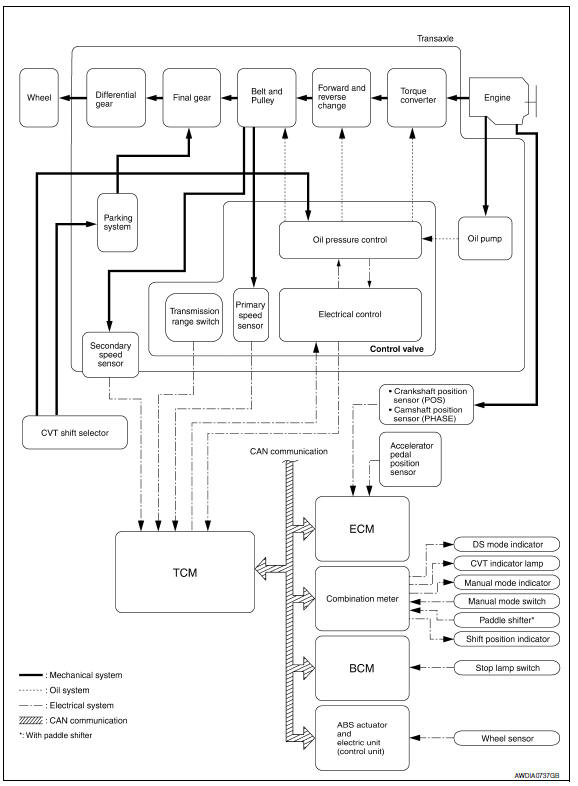
System Diagram
Component Parts Location
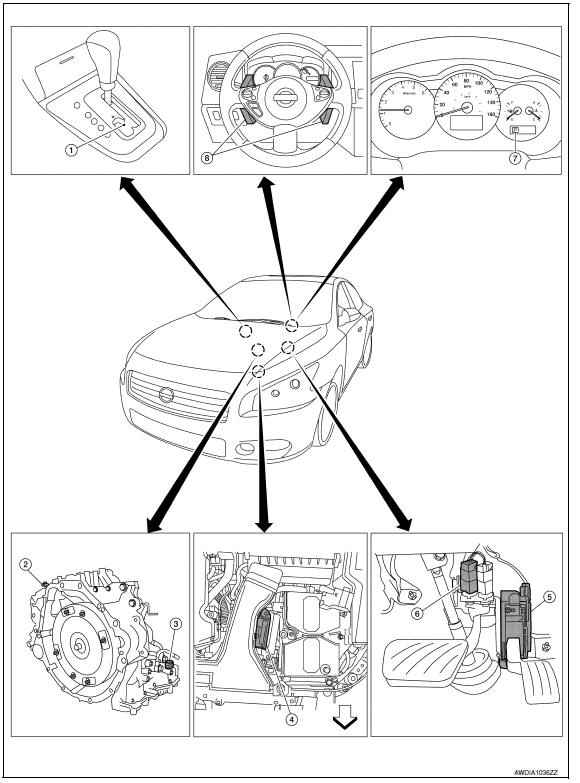
- CVT shift selector assembly (Manual mode select switch and manual mode position select switch)
- Secondary speed sensor
- CVT unit harness connector
- TCM
- Accelerator pedal position (APP) sensor
- Stop lamp switch
- Shift positioner indicator Manual mode indicator DS mode indicator
- Paddle shifters

 Mechanical system
Cross-Sectional View
Converter housing
Oil pump
Forward clutch
Reverse brake
Planetary carrier
Primary pulley
Steel belt
Sun ge ...
Other materials:
Oil Seal
Removal and Installation of Valve Oil Seal
REMOVAL
Turn crankshaft until the cylinder requiring new oil seals is at
TDC. This will prevent valve from dropping into cylinder.
CAUTION: When rotating crankshaft, be
careful to avoid scarring the front cover with the timing chain.
Remove ...
Steering wheel
Inspection
INSTALLATION CONDITION
Check installation conditions of steering gear assembly, front
suspension assembly, axle and steering column assembly.
Check if movement exists when steering wheel is moved up and down,
to the left and right and to the axial direction.
Check steering ...
Types of tires
WARNING
When changing or replacing tires, be
sure all four tires are of the same type
(i.e., Summer, All Season or Snow) and
construction. A NISSAN dealer may be
able to help you with information about
tire type, size, speed rating and
availability.
Replacement tires may have a low ...
Nissan Maxima Owners Manual
- Illustrated table of contents
- Safety-Seats, seat belts and supplemental restraint system
- Instruments and controls
- Pre-driving checks and adjustments
- Monitor, climate, audio, phone and voice recognition systems
- Starting and driving
- In case of emergency
- Appearance and care
- Do-it-yourself
- Maintenance and schedules
- Technical and consumer information
Nissan Maxima Service and Repair Manual

0.0215