
Nissan Maxima Service and Repair Manual: P0778 pressure control solenoid B
Description
The secondary pressure solenoid valve regulates the oil pump discharge pressure to suit the driving condition in response to a signal sent from the TCM.
DTC Logic
DTC DETECTION LOGIC

DTC CONFIRMATION PROCEDURE
CAUTION: Always drive vehicle at a safe speed.
NOTE: Immediately after performing any "DTC CONFIRMATION PROCEDURE", always turn ignition switch OFF.
Then wait at least 10 seconds before performing the next test.
1.CHECK DTC DETECTION
 With CONSULT
- Start engine.
- Drive vehicle and maintain the following conditions for at least 5 consecutive seconds.
- Perform "Self Diagnostic Results" in "TRANSMISSION".
 With GST
Follow the procedure "With CONSULT".
Diagnosis Procedure
Regarding Wiring Diagram information, refer to TM-126, "Wiring Diagram".
1.CHECK SECONDARY PRESSURE SOLENOID VALVE CIRCUIT
- Turn ignition switch OFF.
- Disconnect TCM connector.
- Check resistance between TCM vehicle side harness connector terminal and ground.

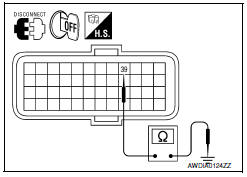
2.CHECK HARNESS BETWEEN TCM AND SECONDARY PRESSURE SOLENOID VALVE (PART 1)
- Disconnect CVT unit connector.
- Check continuity between TCM vehicle side harness connector terminal and CVT unit vehicle side harness connector terminal.

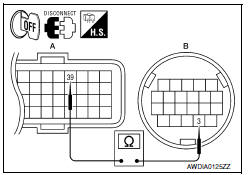
3.CHECK HARNESS BETWEEN TCM AND SECONDARY PRESSURE SOLENOID VALVE (PART 2
Check continuity between TCM vehicle side harness connector terminal and ground.

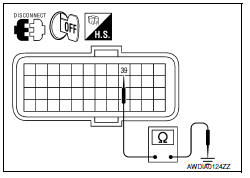
4.CHECK SECONDARY PRESSURE SOLENOID VALVE
Check secondary pressure solenoid valve. Refer to TM-78, "Component Inspection (Secondary Pressure Solenoid Valve)".
5.DETECT MALFUNCTIONING ITEMS
Check TCM connector pin terminals for damage or loose connection with harness connector.
Component Inspection (Secondary Pressure Solenoid Valve)
1.CHECK SECONDARY PRESSURE SOLENOID VALVE
Check resistance between CVT unit connector terminal and ground.

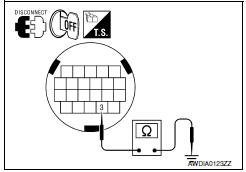
 P0776 pressure control solenoid B
Description
The secondary pressure solenoid valve regulates the secondary pressure to
suit the driving condition in
response to a signal sent from the TCM.
DTC Logic
DTC DETECTION LOGIC
DTC ...
 P0826 up and down shift SW
Description
Manual mode switch transmits signals (manual mode, not manual mode, shift up
and shift down) to combination
meter.
Paddle shifter transmits signals (shift up and shift down) to combi ...
Other materials:
Power window and door lock/unlock switch RH
Removal and Installation
REMOVAL
Remove the front door grip cover. Refer to INT-18, "Removal and
Installation".
Remove the clip (A) from the door grip using suitable tool.
Release the metal clip and lift the power window and door lock/
unlock switch (2) and switc ...
Brake fluid
Inspection
LEVEL CHECK
Make sure that a brake fluid level in reservoir tank is between
MAX
and MIN lines as shown.
Visually check around reservoir tank for fluid leakage.
If the level is excessively low, check brake system for leaks.
If brake warning lamp remains illuminated aft ...
Vacuum lines
Inspection
VISUAL INSPECTION
Check for improper assembly, damage and deterioration. Replace as necessary.
CHECK VALVE INSPECTION
Airtightness Inspection
Use a suitable tool to check the built-in check valve. Replace the
vacuum hose with the built-in check valve as an assembly if the vacuu ...
Nissan Maxima Owners Manual
- Illustrated table of contents
- Safety-Seats, seat belts and supplemental restraint system
- Instruments and controls
- Pre-driving checks and adjustments
- Monitor, climate, audio, phone and voice recognition systems
- Starting and driving
- In case of emergency
- Appearance and care
- Do-it-yourself
- Maintenance and schedules
- Technical and consumer information
Nissan Maxima Service and Repair Manual

0.0124