
Nissan Maxima Service and Repair Manual: P1777 step motor
Description
The step motor changes the step by turning 4 coils ON/OFF according to the signal from TCM. As a result, the flow of line pressure to primary pulley is changed and pulley ratio is controlled.
DTC Logic
DTC DETECTION LOGIC

DTC CONFIRMATION PROCEDURE
CAUTION: Always drive vehicle at a safe speed.
NOTE: Immediately after performing any "DTC CONFIRMATION PROCEDURE", always turn ignition switch OFF.
Then wait at least 10 seconds before performing the next test.
1.CHECK DTC DETECTION
 With CONSULT
-
Start engine.
-
Drive vehicle for at least 5 consecutive seconds.
-
Perform "Self Diagnostic Results" in "TRANSMISSION".
 With GST
Follow the procedure "With CONSULT".
Diagnosis Procedure
Regarding Wiring Diagram information, refer to TM-126, "Wiring Diagram".
1.CHECK STEP MOTOR CIRCUIT
-
Turn ignition switch OFF.
-
Disconnect TCM connector.
-
Check resistance between TCM vehicle side harness connector terminals.
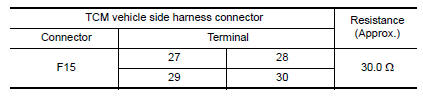
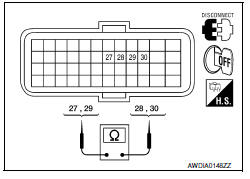
4. Check resistance between TCM vehicle side harness connector terminals and ground.
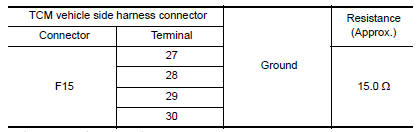
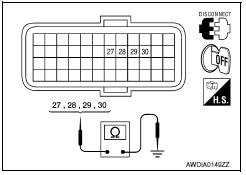
2.CHECK HARNESS BETWEEN TCM AND CVT UNIT (STEP MOTOR) (PART 1)
-
Disconnect CVT unit connector.
-
Check continuity between TCM vehicle side harness connector terminals and CVT unit vehicle side harness connector terminals.
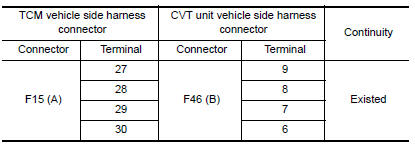
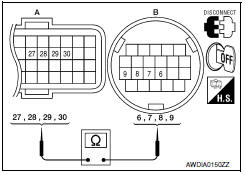
3.CHECK HARNESS BETWEEN TCM AND CVT UNIT (STEP MOTOR) (PART 2)
Check continuity between TCM vehicle side harness connector terminals and ground.
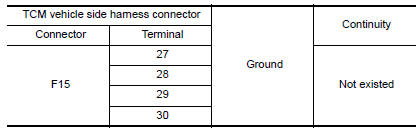
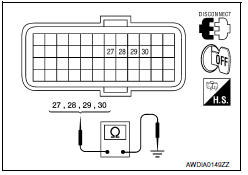
4.CHECK STEP MOTOR
Check step motor. Refer to TM-111, "Component Inspection (Step Motor)".
5.DETECT MALFUNCTIONING ITEMS
Check TCM connector pin terminals for damage or loose connection with harness connector.
Component Inspection (Step Motor)
1.CHECK STEP MOTOR
1. Check resistance between CVT unit connector terminals.
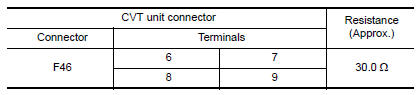
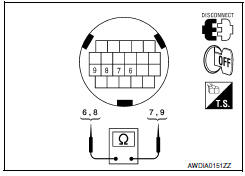
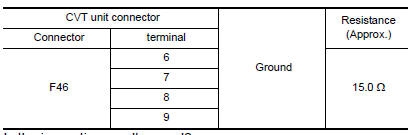
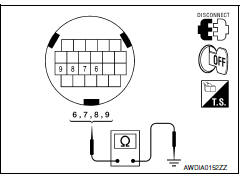
2. Check resistance between CVT unit connector terminals and ground.
 P1745 line pressure control
Description
The line pressure solenoid valve regulates the oil pump
discharge pressure to suit the driving condition in
response to a signal sent from the TCM.
DTC Logic
DTC DETECTION LOGIC
...
 P1778 step motor
Description
The step motor changes the step by turning 4
coils ON/OFF according to the signal from TCM. As a result,
the flow of line pressure to primary pulley is changed and pulle ...
Other materials:
Power supply and ground circuit
AUDIO UNIT
AUDIO UNIT : Diagnosis Procedure
1.CHECK FUSES
2.POWER SUPPLY CIRCUIT CHECK
Disconnect audio unit connector M132.
Check voltage between the audio unit connector M132 and ground.
3.GROUND CIRCUIT CHECK
Inspect audio unit case ground.
DISPLAY UNIT
DISPLAY UNIT : Dia ...
P0131, P0151 A/F sensor 1
Description
The air fuel ratio (A/F) sensor 1 is a planar one-cell limit current sensor.
The sensor element of the A/F sensor 1 is composed an electrode
layer, which transports ions. It has a heater in the element.
The sensor is capable of precise measurement = 1, but also in the
lean ...
Precaution
PRECAUTIONS
Precaution for Supplemental Restraint System (SRS) "AIR BAG" and "SEAT
BELT
PRE-TENSIONER"
The Supplemental Restraint System such as "AIR BAG" and "SEAT BELT
PRE-TENSIONER", used along
with a front seat belt, helps to reduce the risk or severity of injury to ...
Nissan Maxima Owners Manual
- Illustrated table of contents
- Safety-Seats, seat belts and supplemental restraint system
- Instruments and controls
- Pre-driving checks and adjustments
- Monitor, climate, audio, phone and voice recognition systems
- Starting and driving
- In case of emergency
- Appearance and care
- Do-it-yourself
- Maintenance and schedules
- Technical and consumer information
Nissan Maxima Service and Repair Manual

0.0076