
Nissan Maxima Service and Repair Manual: TCM
Exploded View
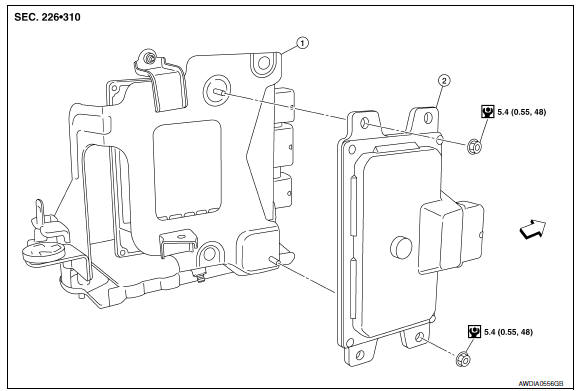
-
Bracket
-
TCM
 Vehicle front
Removal and Installation
CAUTION:
-
Do not impact the TCM when removing or installing TCM.
-
When replacing TCM and transaxle assembly as a set, replace transaxle assembly first and then replace TCM. Refer to TM-8, "Description".
REMOVAL
-
Disconnect the battery negative terminal. Refer to PG-67, "Removal and Installation (Battery)".
-
Remove front air duct. Refer to EM-24, "Removal and Installation".
-
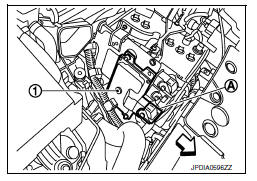
Disconnect TCM harness connector (A).
 :Front
4. Remove TCM nuts and TCM (1) from bracket.
INSTALLATION
Installation is in the reverse order of removal.
Adjustment
ADJUSTMENT AFTER INSTALLATION Perform "ADDITIONAL SERVICE WHEN REPLACING TCM". Refer to TM-8, "Description".

 CVT shift selector
Exploded View
CVT shift selector handle
Shift selector handle clip
Shift selector handle cover
CVT shift selector assembly
Shi ...
Other materials:
Meter
Wiring Diagram
...
Crash zone sensor
Component
Crash zone sensor harness connector
Crash zone sensor
Nut
Front
Removal and Installation
CAUTION:
Before servicing, turn ignition switch OFF, disconnect both
battery terminals and wait at least 3 minutes.
Do not use air tools or electric tools for servicing.
...
Lighting & turn signal switch
Removal and Installation
NOTE: The lighting and turn signal switch is
integral with the combination switch assembly.
REMOVAL
Unlock steering wheel.
CAUTION:
Before servicing, disconnect both battery terminals and wait
at least three minutes
Do not use air tools or electric tools ...
Nissan Maxima Owners Manual
- Illustrated table of contents
- Safety-Seats, seat belts and supplemental restraint system
- Instruments and controls
- Pre-driving checks and adjustments
- Monitor, climate, audio, phone and voice recognition systems
- Starting and driving
- In case of emergency
- Appearance and care
- Do-it-yourself
- Maintenance and schedules
- Technical and consumer information
Nissan Maxima Service and Repair Manual

0.0137