
Nissan Maxima Service and Repair Manual: Symptom diagnosis
NOISE, VIBRATION, AND HARSHNESS (NVH) TROUBLESHOOTING
NVH Troubleshooting Chart
Use chart below to help you find the cause of the symptom. If necessary, repair or replace these parts.
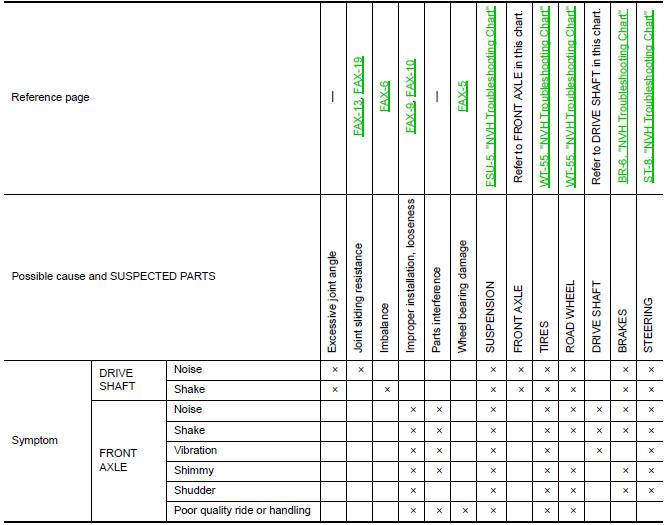
×: Applicable
 Preparation
Special Service Tool
The actual shapes of the tools may differ from those illustrated here.
Commercial Service Tool
...

Other materials:
Interior room lamp control circuit
Description
Controls each interior room lamp (ground side) by PWM signal.
NOTE: PWM signal control period is
approximately 250 Hz (in the gradual brightening/dimming).
Component Function Check
CAUTION: Before performing the diagnosis,
check that the following is normal.
Battery saver ou ...
Diagnosis system (BCM)
DOOR LOCK
DOOR LOCK : CONSULT Function (BCM - DOOR LOCK)
SELF DIAGNOSTIC RESULT
DATA MONITOR
ACTIVE TEST
WORK SUPPORT
* : Initial setting
INTELLIGENT KEY
INTELLIGENT KEY : CONSULT Function (BCM - INTELLIGENT KEY)
DATA MONITOR
ACTIVE TEST
WORK SUPPORT
*: Initia ...
Wiring diagram
COLOR DISPLAY
Wiring Diagram - With BOSE audio system With Navigation System
...
Nissan Maxima Owners Manual
- Illustrated table of contents
- Safety-Seats, seat belts and supplemental restraint system
- Instruments and controls
- Pre-driving checks and adjustments
- Monitor, climate, audio, phone and voice recognition systems
- Starting and driving
- In case of emergency
- Appearance and care
- Do-it-yourself
- Maintenance and schedules
- Technical and consumer information
Nissan Maxima Service and Repair Manual

0.0082