
Nissan Maxima Service and Repair Manual: Front coil spring and strut
Removal and Insallation
REMOVAL
- Remove front wheel and tire using power tool. Refer to WT-60, "Adjustment".
- Remove the wheel sensor harness from the front coil spring and strut. Refer to BRC-102, "Removal and Installation - Front Wheel Sensor".
- Remove the brake hose lock plate.
- Remove the lower strut bolts and nuts. Refer to FSU-13, "Exploded View".
- Remove the front side cover from the strut tower.
- Remove the upper strut bolts and remove the front coil spring and strut from vehicle.
INSPECTION AFTER REMOVAL
Check the front coil spring and strut for any oil leakage or other damage. Replace as necessary.
INSTALLATION
Installation is in the reverse order of removal.
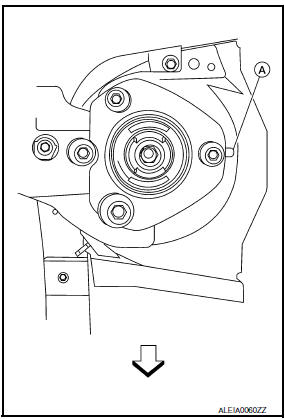
CAUTION: Do not reuse the lower strut nuts.
- - Be sure tab (A) on strut mount insulator is positioned as shown.
 : Front
 - - Check wheel alignment. Refer to FSU-6, "Inspection and Adjustment".
Disposal
- Set the front suspension strut horizontally with the piston rod fully extended.
- Drill 2 - 3 mm (0.08 - 0.12 in) hole at the position (
 ) from top as shown to release gas
gradually.
) from top as shown to release gas
gradually.
CAUTION:
- Wear eye protection (safety glasses).
- Wear gloves.
- Be careful with metal chips or oil blown out by the compressed gas.
NOTE:
- Drill vertically in this direction (
 ).
). - Directly to the outer tube avoiding brackets.
- The gas is clear, colorless, odorless, and harmless.
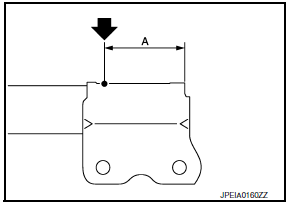
(A) : 20 - 30 mm (0.79 - 1.18 in)
- Position the drilled hole downward and drain oil by moving the piston rod several times.
CAUTION: Dispose of drained oil according to the law and local regulations.

 Transverse link
Removal and Installation
REMOVAL
Remove front wheel and tire using power tool. Refer to WT-60,
"Adjustment".
Remove the knuckle spindle bolt and nut at the transverse link.
Remove the stee ...
Other materials:
Preparation
PREPARATION
Special Service Tool
The actual shape of the tools may differ from those illustrated here.
Commercial Service Tools
...
Active trace control
The Integrated Dynamics-control Module is an
electric control module that includes the following
functions:
Active Trace Control
Active Engine Brake
Active Ride Control
This system senses driving based on the driver's
steering and acceleration/braking patterns, and
controls brake pres ...
P0116 ECT sensor
Description
The engine coolant temperature sensor is used to detect the engine
coolant temperature. The sensor modifies a voltage signal from the
ECM. The modified signal returns to the ECM as the engine coolant
temperature input. The sensor uses a thermistor which is sensitive to
the c ...
Nissan Maxima Owners Manual
- Illustrated table of contents
- Safety-Seats, seat belts and supplemental restraint system
- Instruments and controls
- Pre-driving checks and adjustments
- Monitor, climate, audio, phone and voice recognition systems
- Starting and driving
- In case of emergency
- Appearance and care
- Do-it-yourself
- Maintenance and schedules
- Technical and consumer information
Nissan Maxima Service and Repair Manual

0.0085