
Nissan Maxima Service and Repair Manual: Tilt motor
Exploded View
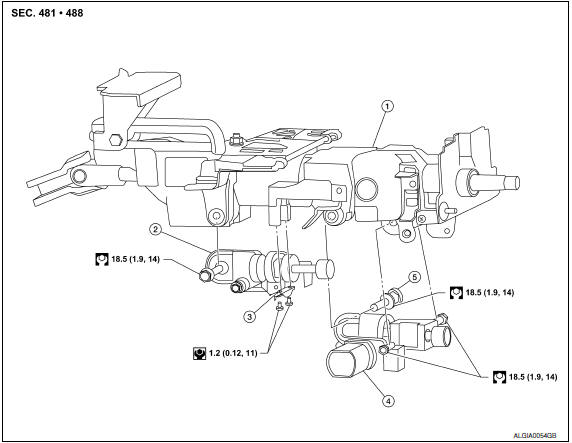
- Steering column assembly
- Telescope motor
- Telescope motor link bracket
- Tilt motor
- Tilt motor bolt cap
Removal and Installation
REMOVAL
- Remove instrument lower panel LH. Refer to IP-19, "Removal and Installation".
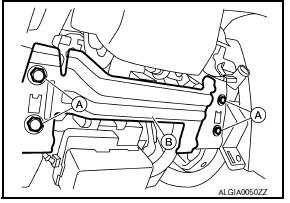
- Remove lower knee protector (LH) bolts (A) and the lower knee protector (LH) (B).
- Telescope the steering wheel to the full out position and tilt to highest position. NOTE: If either function is inoperative you can do this manually prior to installation.
- Remove the steering column covers. Refer to IP-11, "Removal and
Installation".
NOTE: The tilt/telescope switch can remain attached to the side cover.
- Remove the tilt motor as follows.
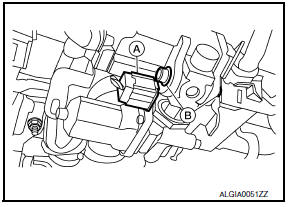
- Disconnect the harness connector (A) from the tilt motor.
- Remove the tilt motor link bolts (B).
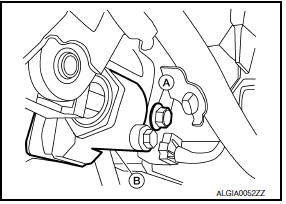
- Remove the tilt motor bolt (A) from the RH side of column.
- Remove the tilt motor (B).
NOTE: If the steering wheel could not be tilted to the highest position, manually tilt steering wheel to the highest position.
INSTALLATION
Installation is in the reverse order of removal.
NOTE:
- When installing the tilt motor link bolts, manually move steering wheel up and down to align the bolt holes.
- Inform customer that they will need to reset their Automatic Drive Positioner (ADP) settings.
 Steering wheel
Removal and Installation
REMOVAL
NOTE: When removing spiral cable, use tape
so that the case and rotating part keep aligned. This will prevent neutral
position alignment procedure during spiral ...
 Telescopic motor
Exploded View
Steering column assembly
Telescope motor
Telescope motor link bracket
Tilt motor
Tilt motor bolt cap
Removal and Installation
REMOVAL
Remove instrument lower pan ...
Other materials:
Front coil spring and strut
Removal and Insallation
REMOVAL
Remove front wheel and tire using power tool. Refer to WT-60,
"Adjustment".
Remove the wheel sensor harness from the front coil spring and
strut. Refer to BRC-102, "Removal and Installation - Front Wheel Sensor".
Remove the brake hose lock plate.
Remo ...
Horn function
Symptom Table
HAZARD AND HORN REMINDER FUNCTION MALFUNCTION
NOTE:
Before performing the diagnosis in the following table, check
"Work flow". Refer to DLK-9, "Work Flow".
If the following symptoms are detected, check systems shown in
the "Diagnosis/service procedure" column
...
Map lights
To turn the map lights on, push the switches. To
turn them off, push the switches again.
CAUTION
Do not use for extended periods of time
with the engine stopped. This could result
in a discharged battery.
Personal lights
To turn the rear personal lights on, push the
switch. To turn the ...
Nissan Maxima Owners Manual
- Illustrated table of contents
- Safety-Seats, seat belts and supplemental restraint system
- Instruments and controls
- Pre-driving checks and adjustments
- Monitor, climate, audio, phone and voice recognition systems
- Starting and driving
- In case of emergency
- Appearance and care
- Do-it-yourself
- Maintenance and schedules
- Technical and consumer information
Nissan Maxima Service and Repair Manual

0.012