
Nissan Maxima Service and Repair Manual: B1086 - B1089 seat belt pre-tensioner LH
Description
DTC B1086 - B1089 SEAT BELT PRE-TENSIONER LH
The seat belt pre-tensioner LH is wired to the air bag diagnosis sensor unit.
The air bag diagnosis sensor unit
will monitor for opens and shorts in
detected lines to the seat belt pre-tensioner LH.
PART LOCATION
DTC Logic
DTC DETECTION LOGIC
With CONSULT
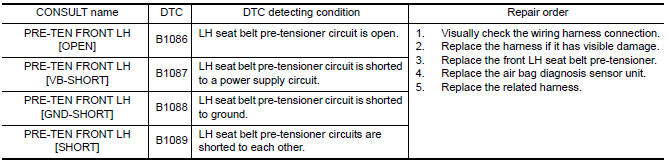
DTC CONFIRMATION PROCEDURE (With CONSULT)
1.CHECK SELF-DIAG RESULT
- Turn ignition switch ON.
- Check for DTC using CONSULT.
2.ERASE SELF-DIAG RESULT
Erase the DTC using CONSULT.
DTC CONFIRMATION PROCEDURE (Without CONSULT)
1.CHECK SELF-DIAG RESULT
- Turn ignition switch ON.
- Check the air bag warning lamp status. Refer to SRC-14, "Trouble Diagnosis without CONSULT".
NOTE:
SRS will not enter diagnosis mode if
no malfunction is detected in user mode.
Diagnosis Procedure
1.HARNESS CONNECTOR
Visually inspect all applicable harness connectors for the following:
- Visible damage to connector or terminal
- Loose terminal
- Poor connection
NOTE:
All harness connectors should be
inspected from the air bag diagnosis sensor unit to the end component
(including any in-line connectors).
2.CONFIRM DTC
- Reconnect all harness connectors.
- Turn ignition switch ON.
- Check for DTC using CONSULT.
3.WIRING HARNESS
Check the wiring harness for visible damage.
NOTE:
The entire wiring harness should be
inspected from the air bag diagnosis sensor unit to the end component
(including any in-line connectors).
4.CONFIRM DTC
- Reconnect all harness connectors.
- Turn ignition switch ON.
- Check for DTC using CONSULT.
5.AIR BAG DIAGNOSIS SENSOR UNIT
- Replace the air bag diagnosis sensor unit. Refer to SR-31, "Removal and Installation".
- Turn ignition switch ON.
- Check for DTC using CONSULT.
6.SEAT BELT PRE-TENSIONER LH
- Replace the seat belt pre-tensioner LH. Refer to SB-6, "Removal and Installation".
- Turn ignition switch ON.
- Check for DTC using CONSULT.
7.RELATED HARNESS
Replace the related harness.
 B1145 - B1148 side curtain air bag module RH
Description
DTC B1145 - B1148 RH SIDE CURTAIN AIR BAG MODULE
The RH side curtain air bag module is wired to the air bag diagnosis sensor
unit. The air bag diagnosis sensorunit will monitor for ope ...
 B1081 - B1084 seat belt pre-tensioner RH
Description
DTC B1081 - B1084 SEAT BELT PRE-TENSIONER RH
The seat belt pre-tensioner RH is wired to the air bag diagnosis sensor unit.
The air bag diagnosis sensor unitwill monitor for opens and s ...
Other materials:
Brake tube and hose
Hydraulic Circuit
Actuator
Master cylinder
Brake booster
Connector
Union bolt
18.2 N*m (1.9 kg-m, 13 ft-lb)
Flare nut M12
22.1 N*m (2.3 kg-m, 16 ft-lb)
Flare nut M10
16.2 N*m (1.7 kg-m, 12 ft-lb)
CAUTION:
All hoses and piping (tubes) must be free fr ...
C1130, C1131, C1132, C1133, C1136 engine signal
Description
ABS actuator and electric unit (control unit) and ECM exchange the engine
signal with CAN communication
line.
DTC Logic
DTC DETECTION LOGIC
DTC CONFIRMATION PROCEDURE
1.CHECK SELF-DIAGNOSIS RESULTS
Check the self-diagnosis results.
Diagnosis Procedure
1.CHECK ENGINE S ...
Adjusting the screen
1. While on a RearView Monitor screen, touch
the touch-screen display. The Camera Settings
screen will come up.
2. Touch the Display Settings key.
3. Touch the "Brightness," "Contrast," "Tint,"
"Color," or "Black Level" key.
4. Adjust the item by touching the + or - key
on the touch ...
Nissan Maxima Owners Manual
- Illustrated table of contents
- Safety-Seats, seat belts and supplemental restraint system
- Instruments and controls
- Pre-driving checks and adjustments
- Monitor, climate, audio, phone and voice recognition systems
- Starting and driving
- In case of emergency
- Appearance and care
- Do-it-yourself
- Maintenance and schedules
- Technical and consumer information
Nissan Maxima Service and Repair Manual

0.0301