
Nissan Maxima Service and Repair Manual: B1017 - B1022 occupant classification system
Description
DTC B1017 - B1022 OCCUPANT CLASSIFICATION SYSTEM (OCS)
The occupant classification system control unit is wired to the air bag
diagnosis sensor unit. The air bag diagnosis
sensor unit will monitor the
occupant classification system for control unit and sensor mat failures and
interruptions in communication between the OCS control unit and the air bag
diagnosis sensor unit.
PART LOCATION
DTC Logic
DTC DETECTION LOGIC
With CONSULT
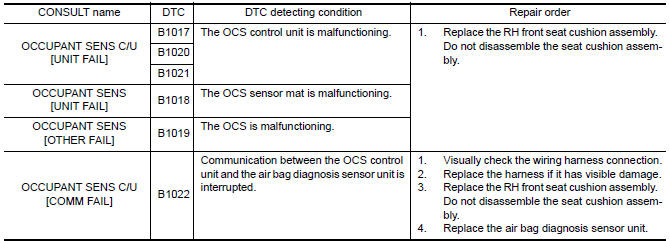
DTC CONFIRMATION PROCEDURE (With CONSULT)
1.CHECK SELF-DIAG RESULT
- . Turn ignition switch ON.
- Check for DTC using CONSULT
2.ERASE SELF-DIAG RESULT
Erase the DTC using CONSULT.
DTC CONFIRMATION PROCEDURE (Without CONSULT)
1.CHECK SELF-DIAG RESULT
- Turn ignition switch ON.
- Check the air bag warning lamp status. Refer to SRC-14, "Trouble Diagnosis without CONSULT".
NOTE:
SRS will not enter diagnosis mode if
no malfunction is detected in user mode.
Diagnosis Procedure
1.HARNESS CONNECTOR
Visually inspect all applicable harness connectors for the following:
- Visible damage to connector or terminal
- Loose terminal
- Poor connection
NOTE:
All harness connectors should be
inspected from the air bag diagnosis sensor unit to the end component
(including any in-line connectors).
2.CONFIRM DTC
- Reconnect all harness connectors.
- Turn ignition switch ON.
- Check for DTC using CONSULT.
3.WIRING HARNESS
Check the wiring harness for visible damage.
NOTE:
The entire wiring harness should be
inspected from the air bag diagnosis sensor unit to the end component
(including any in-line connectors).
4.CONFIRM DTC
- Reconnect all harness connectors.
- Turn ignition switch ON.
- Check for DTC using CONSULT.
5.AIR BAG DIAGNOSIS SENSOR UNIT
- Replace the air bag diagnosis sensor unit. Refer to SR-31, "Removal and Installation".
- Turn ignition switch ON.
- Check for DTC using CONSULT.
6.RH FRONT SEAT CUSHION ASSEMBLY
- Replace the RH front seat cushion assembly. Refer to SE-68,
"Removal and Installation" (with climate
controlled seats) or SE-126, "Removal and Installation" (without climate controlled seats). - Turn ignition switch ON.
- Check for DTC using CONSULT
7.RELATED HARNESS
Replace the related harness.
 B1023 passenger air bag off indicator
Description
DTC B1023 FRONT PASSENGER AIR BAG OFF INDICATOR
The front passenger air bag off indicator is wired to the air bag diagnosis
sensor unit. The air bag diagnosissensor unit monitors the f ...
 B1209 - B1210 collision detection
Description
DTC B1209 - B1210 COLLISION DETECTION
The air bag diagnosis sensor unit will set this DTC if it has detected a
collision which has resulted in a frontalor side deployment of one or mor ...
Other materials:
Intelligent key
Description
The following functions are available when having and carrying the
Intelligent Key.
Door lock/unlock
Trunk open
Remote control entry function and panic alarm function are available when
operating the remote buttons.
Component Function Check
NOTE:
The Signal Tech II To ...
Normal operating condition
Description
The majority of the audio concerns are the result of outside causes (bad CD,
electromagnetic interference, etc.).
NOISE
The following noise results from variations in field strength, such as fading
noise and multi-path noise, or external noise from trains and other sources.
It i ...
Opening windows
The Intelligent Key allows you to simultaneously
open windows equipped with automatic operation.
To open the windows, press and hold
the button on the Intelligent
Key for
longer than 3 seconds.
The door windows will lower while holding down
the button on the Intelligent Key.
NOTE: ...
Nissan Maxima Owners Manual
- Illustrated table of contents
- Safety-Seats, seat belts and supplemental restraint system
- Instruments and controls
- Pre-driving checks and adjustments
- Monitor, climate, audio, phone and voice recognition systems
- Starting and driving
- In case of emergency
- Appearance and care
- Do-it-yourself
- Maintenance and schedules
- Technical and consumer information
Nissan Maxima Service and Repair Manual

0.012