
Nissan Maxima Service and Repair Manual: Periodic maintenance
IN-CABIN MICROFILTER
Removal and Installation
REMOVAL
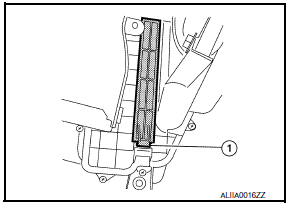
- Disengage the filter cover tab (1) by pushing up and pull out to remove the filter cover.
- Remove the in-cabin microfilter from the blower unit.
INSTALLATION
Installation is in the reverse order of removal.
 System description
AUTOMATIC AIR CONDITIONER SYSTEM
WITH COLOR DISPLAY
WITH COLOR DISPLAY : Switches And Their Control F
WITH COLOR DISPLAY : Discharge Air Flow
WITH MONOCHROME DISPLAY
WITH MONOCHROME DISPLAY : ...

Other materials:
U1200 AV control unit
Description
Replace the AV control unit if this DTC is displayed.
Part name
Description
AV CONTROL UNIT
It is the master unit of the MULTI AV system and it is connected
to each control unit by means of communication. It operates each
syste ...
P1554 battery current sensor
Description
The power generation voltage variable control enables fuel consumption to be
decreased by reducing the
engine load which is caused by the power generation of the generator. The
battery current sensor is installed
to the battery cable at the negative terminal. The sensor measures ...
Combination switch reading system
System Diagram
System Description
OUTLINE
BCM reads the status of the combination switch (light, turn
signal, wiper and washer) and recognizes the status of each switch.
BCM has a combination of 5 output terminals (OUTPUT 1 - 5) and 5
input terminals (INPUT 1 - 5) and reads a maximum ...
Nissan Maxima Owners Manual
- Illustrated table of contents
- Safety-Seats, seat belts and supplemental restraint system
- Instruments and controls
- Pre-driving checks and adjustments
- Monitor, climate, audio, phone and voice recognition systems
- Starting and driving
- In case of emergency
- Appearance and care
- Do-it-yourself
- Maintenance and schedules
- Technical and consumer information
Nissan Maxima Service and Repair Manual

0.0083