
Nissan Maxima Service and Repair Manual: Door motor
Exploded View
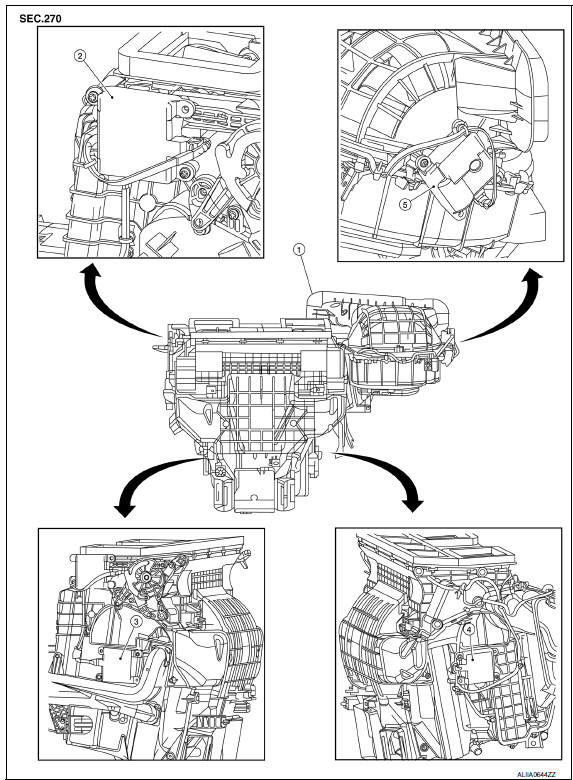
- Heating and cooling unit assembly
- Mode door motor
- Air mix door motor (driver side)
- Air mix door motor (passenger side)
- Intake door motor
INTAKE DOOR MOTOR
INTAKE DOOR MOTOR: Removal and Installation
REMOVAL
- Remove the glove box assembly. Refer to IP-20, "Removal and Installation".
- Remove the remote keyless entry receiver and bracket to reposition out of the way.
- Disconnect the harness connector from the intake door motor.
- Remove the intake door motor screws and the intake door motor from the blower unit.
INSTALLATION
Installation is in the reverse order of removal.
MODE DOOR MOTOR
MODE DOOR MOTOR: Removal and Installation
REMOVAL
- Remove the combination meter. Refer to MWI-122, "Removal and Installation".
- Remove the BCM. Refer to BCS-79, "Removal and Installation".
- Disconnect the harness connector from the mode door motor.
- Remove the mode door motor screws and the mode door motor.
INSTALLATION
Installation is in the reverse order of removal.
AIR MIX DOOR MOTOR
AIR MIX DOOR MOTOR: Removal and Installation - Air Mix Door Motor (Driver Side)
REMOVAL
- Remove the instrument lower panel LH. Refer to IP-19, "Removal and Installation".
- Remove the upper floor connecting duct (LH). Refer to HA-47, "Exploded View".
- Remove the tire pressure receiver.
- Disconnect the harness connector from the air mix door motor.
- Remove the air mix door motor screws and the air mix door motor (driver side).
INSTALLATION
Installation is in the reverse order of removal.
AIR MIX DOOR MOTOR: Removal and Installation - Air Mix Door Motor (Passenger Side)
REMOVAL
- Remove the glove box assembly. Refer to IP-20, "Removal and Installation".
- Remove the upper floor connecting duct (RH). Refer to HA-47, "Exploded View".
- Disconnect the harness connector from the air mix door motor.
- Remove the air mix door motor screws and the air mix door motor (passenger side).
INSTALLATION
Installation is in the reverse order of removal.
 Refrigerant pressure sensor
Removal and Installation
REMOVAL
Discharge the refrigerant. Refer to HA-28, "Recycle Refrigerant".
Remove the core support upper cover.
Disconnect the harness connector from the ref ...
 Body interior
...
Other materials:
Extended storage switch
The extended storage switch is used when the
vehicle is in transit from the factory. It is located in
the fuse panel to the left of the steering wheel on
the instrument panel. If any electrical equipment
does not operate, ensure the extended storage
switch is pushed fully in place, as shown ...
Engine block heater (if so equipped)
Engine block heaters are used to assist with cold
temperature starting.
The engine block heater should be used when
the outside temperature is 20F (-7C) or lower.
WARNING
Do not use your engine block heater
with an ungrounded electrical system or
a 2-pronged adapter. You can be serious ...
Power supply and ground circuit
BCM
BCM : Diagnosis Procedure
1. CHECK FUSE AND FUSIBLE LINK
Check if the following BCM fuses or fusible link are blown.
2. CHECK POWER SUPPLY CIRCUIT
Turn ignition switch OFF.
Disconnect BCM.
Check voltage between BCM harness connector and ground.
3. CHECK GROUND CIRCUIT
Che ...
Nissan Maxima Owners Manual
- Illustrated table of contents
- Safety-Seats, seat belts and supplemental restraint system
- Instruments and controls
- Pre-driving checks and adjustments
- Monitor, climate, audio, phone and voice recognition systems
- Starting and driving
- In case of emergency
- Appearance and care
- Do-it-yourself
- Maintenance and schedules
- Technical and consumer information
Nissan Maxima Service and Repair Manual

0.0083