
Nissan Maxima Service and Repair Manual: Cluster lid C
Removal and Installation
CLUSTER LID C
NOTE: The cluster lid C lower finisher is only used in vehicles equipped with monochrome display unit.
Removal - With Monochrome Display
- Release the clips and pawls and remove cluster lid C lower finisher (1).
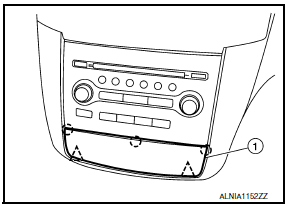
 : Clip
 :
Pawl
:
Pawl
- Remove cluster lid C (base audio) with the base audio unit.
Refer to AV-73, "Removal and Installation" (BASE AUDIO) or AV-161, "Removal and Installation" (BOSE W/MONOCHROME DISPLAY).
Installation
Installation is in the reverse order of removal.
Removal - With Color Display
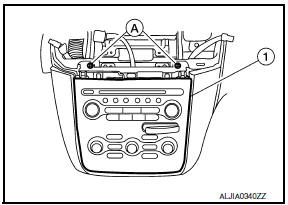
- Remove cluster lid D. Refer to IP-18, "Removal and Installation".
- Remove the screws (A) and reposition cluster lid C (1) to access the harness connectors.
- Disconnect the harness connectors and the remove cluster lid C (Bose audio) with the Bose audio unit. Refer to AV-481, "Removal and Installation" (BOSE W/COLOR DISPLAY) or AV- 655, "Removal and Installation" (BOSE W/COLOR DISPLAY W/ NAVI
Installation
Installation is in the reverse order of removal.
 Cluster lid A
Removal and Installation
REMOVAL
Using a suitable tool, gently remove the instrument side finisher
LH (1).
Remove the instrument lower panel LH (1).
Open the fuse block cover and rem ...
 Cluster lid D
Removal and Installation
REMOVAL
Release the metal clips using a suitable tool, then position
cluster lid D (1) aside.
Disconnect the harness connectors, then remove cluster lid D
(1).
...
Other materials:
Trunk opener request switch
Removal and Installation
REMOVAL
Remove the license lamp finisher (1). Refer to EXL-166, "Removal
and Installation".
Remove the inner bracket screws (A) and inner bracket (2) from
license lamp finisher (1).
Remove the trunk lid request switch screw (B) and trunk lid
req ...
Tel antenna
Removal and Installation
REMOVAL
Disconnect the battery negative terminal. Refer to PG-67, "Removal
and Installation (Battery)".
Remove the rear parcel shelf finisher. Refer to INT-28, "Removal
and Installation".
Remove the Bluetooth antenna screw (A).
Detach the ...
U1001 can comm circuit
Description
CAN (Controller Area Network) is a serial communication line for real time
application. It is an on-vehicle multiplex
communication line with high data communication speed and excellent error
detection ability. Many electronic
control units are equipped onto a vehicle, and each ...
Nissan Maxima Owners Manual
- Illustrated table of contents
- Safety-Seats, seat belts and supplemental restraint system
- Instruments and controls
- Pre-driving checks and adjustments
- Monitor, climate, audio, phone and voice recognition systems
- Starting and driving
- In case of emergency
- Appearance and care
- Do-it-yourself
- Maintenance and schedules
- Technical and consumer information
Nissan Maxima Service and Repair Manual

0.0077