
Nissan Maxima Service and Repair Manual: AV control unit
Removal and Installation
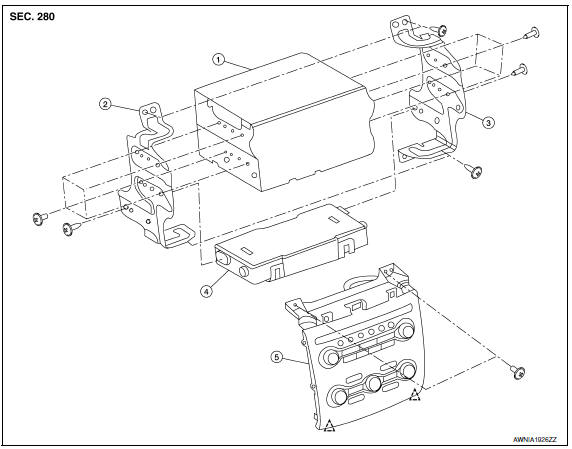
- AV control unit
- AV control unit bracket LH
- AV control unit bracket RH
- A/C auto amp.
- Cluster lid C (with A/C and AV switch assembly attached)
Clip
AV CONTROL UNIT
Removal
CAUTION: Before replacing AV control unit, perform "READ CONFIGURATION" to save current vehicle specification.
Refer to AV-180, "ADDITIONAL SERVICE WHEN REPLACING CONTROL UNIT : Special Repair Requirement".
- Disconnect the battery negative terminal.
- Remove the cluster lid D. Refer to IP-11, "Removal and Installation".
- Remove the cluster lid C
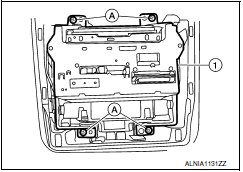
- Remove the av control unit screws (A), then pull out the av control unit (1), disconnect the av control unit connectors and remove the av control unit (1).
Installation
Installation is in the reverse order of removal.
CAUTION:
- - When replacing AV control unit, perform "WRITE CONFIGURATION". Refer to AV-180, "ADDITIONAL SERVICE WHEN REPLACING CONTROL UNIT : Special Repair Requirement".
A/C AND AV SWITCH ASSEMBLY
Removal
- Remove the cluster lid D. Refer to IP-11, "Removal and Installation".
- Remove the cluster lid C. Refer to IP-10, "Exploded View".
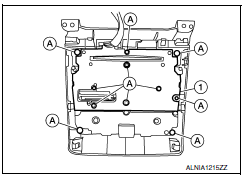
- Remove the A/C and AV switch assembly screws (A), then pull out the A/C and AV switch assembly (1) from cluster lid C.
Installation
Installation is in the reverse order of removal.

 Multifunction switch
Removal and Installation
REMOVAL
Remove cluster lid D. Refer to IP-10, "Exploded View".
Remove the four multifunction switch screws (A) and remove the
multifunction switch (2) from ...
Other materials:
Body sealing
Description
The following figure shows the areas which are sealed at the factory. Sealant
which has been applied to these
areas should be smooth and free from cuts or gaps. Care should be taken not to
apply an excess amount of
sealant and not to allow other unaffected parts to come into con ...
BCM (body control module)
Reference Value
NOTE: The Signal Tech II Tool (J-50190) can be used
to perform the following functions. Refer to the Signal Tech II User Guide
for additional information.
Activate and display TPMS transmitter IDs
Display tire pressure reported by the TPMS transmitter
Read TPMS DTCs
Re ...
Rear view monitor system
System Diagram
System Description
When the shift selector is in the R position, the display unit shows a view
to the rear of the vehicle. Lines which
indicate the vehicle clearance and distances are also displayed.
Component Parts Location
Tweeter LH M51
Center speaker M130
...
Nissan Maxima Owners Manual
- Illustrated table of contents
- Safety-Seats, seat belts and supplemental restraint system
- Instruments and controls
- Pre-driving checks and adjustments
- Monitor, climate, audio, phone and voice recognition systems
- Starting and driving
- In case of emergency
- Appearance and care
- Do-it-yourself
- Maintenance and schedules
- Technical and consumer information
Nissan Maxima Service and Repair Manual

0.0148