
Nissan Maxima Service and Repair Manual: Instrument lower panel LH
Removal and Installation
REMOVAL
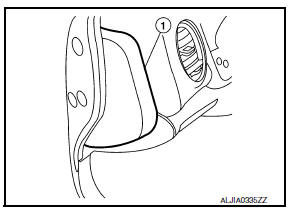
- Using a suitable tool, gently remove the instrument side finisher (LH) (1).
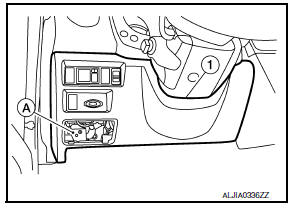
- Remove the instrument lower panel (LH) (1).
- Open the fuse block cover and remove the instrument lower panel screw (A).
- Disconnect the harness connectors and aspirator hose.
- Remove the instrument lower panel (LH) (1).
INSTALLATION
Installation is in the reverse order of removal.
 Cluster lid D
Removal and Installation
REMOVAL
Release the metal clips using a suitable tool, then position
cluster lid D (1) aside.
Disconnect the harness connectors, then remove cluster lid D
(1).
...
 Glove box assembly
Removal and Installation
REMOVAL
Using a suitable tool, gently remove the instrument panel side
finisher (RH).
Open the glove box door and then remove the glove box assembly
screws (A).
...
Other materials:
Trunk lid opener switch
Removal and Installation
REMOVAL
Remove the instrument lower panel LH. Refer to IP-19, "Removal and
Installation".
Release pawls (A), and press trunk lid opener switch (1) front
side to remove from instrument lower panel LH.
INSTALLATION
Installation is in the reverse ...
P0461 fuel level sensor
Description
The fuel level sensor is mounted in the fuel level sensor unit.
The sensor detects a fuel level in the fuel tank and transmits a signal to the
combination meter. The combination
meter sends the fuel level sensor signal to the ECM via the CAN communication
line.
It consists o ...
Illumination control system
System Diagram
System Description
The illumination lamps operation is dependent upon the position of the
lighting switch (combination switch).
When the lighting switch is placed in
the 1ST or 2ND position (or if the auto light system is activated) the BCM
(body control module) receives in ...
Nissan Maxima Owners Manual
- Illustrated table of contents
- Safety-Seats, seat belts and supplemental restraint system
- Instruments and controls
- Pre-driving checks and adjustments
- Monitor, climate, audio, phone and voice recognition systems
- Starting and driving
- In case of emergency
- Appearance and care
- Do-it-yourself
- Maintenance and schedules
- Technical and consumer information
Nissan Maxima Service and Repair Manual

0.0086