
Nissan Maxima Service and Repair Manual: Telescopic switch
Description
ADP steering switch (telescopic switch) is equipped to the steering column. The operation signal is input to the automatic drive positioner control unit when the telescopic switch is operated.
Component Function Check
1. CHECK FUNCTION
- Select "TELESCO SW-FR", "TELESCO SW-RR" in "DATA MONITOR" mode with CONSULT.
- Check telescopic switch signal under the following conditions.

Diagnosis Procedure
Regarding Wiring Diagram information, refer to ADP-150, "Wiring Diagram".
1. CHECK TELESCOPIC SWITCH SIGNAL
- Turn ignition switch OFF.
- Disconnect ADP steering switch (telescopic switch).
- Check voltage between ADP steering switch harness connector and ground.

2. CHECK TELESCOPIC SWITCH CIRCUIT
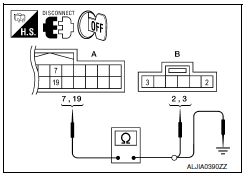
- Disconnect automatic drive positioner control unit.
- Check continuity between automatic drive positioner control unit harness connector and ADP steering switch harness connector
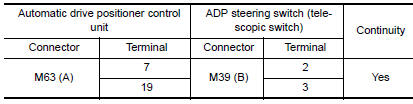
- Check continuity between automatic drive positioner control unit harness connector and ground.

3. CHECK TELESCOPIC SWITCH
4. CHECK INTERMITTENT INCIDENT
Component Inspection
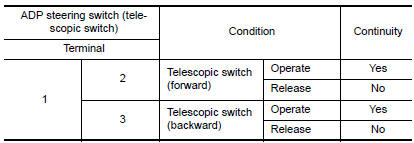
1. CHECK TELESCOPIC SWITCH
- Turn ignition switch OFF.
- Disconnect ADP steering switch (telescopic switch).
- Check continuity between ADP steering switch terminals.
 Tilt switch
Description
ADP steering switch (tilt switch) is equipped to the steering column. The
operation signal is input to the automatic drive positioner control unit when
the tilt switch is operated.
C ...
 Seat memory switch
Description
Seat memory switch is installed to the front door LH trim. The operation
signal is input to the driver seat control unit when the seat memory switch
is operated.
Component Function C ...
Other materials:
DLC branch line circuit
Diagnosis Procedure
1.CHECK CONNECTOR
Turn the ignition switch OFF.
Disconnect the battery cable from the negative terminal.
Check the terminals and connectors of the data link connector for
damage, bend and loose connection
(connector side and harness side).
2.CHECK HARNESS FOR OP ...
Exterior rear
Rear window defroster switch
High-mounted stop light
Interior trunk lid release. Trunk lid
Exterior trunk lid release/request button. Rearview camera
Rear sonar sensors (if so equipped)
Replacing bulbs
Fuel-filler door. Fuel recommendation
Child safety rear door locks
R ...
Maintenance under severe operating conditions
Severe driving conditions
The maintenance intervals shown on the preceding pages are for normal
operating conditions. If the vehicle is mainly operated under severe driving
conditions as shown below, more frequent maintenance must be performed on the
following items as shown in the table.
...
Nissan Maxima Owners Manual
- Illustrated table of contents
- Safety-Seats, seat belts and supplemental restraint system
- Instruments and controls
- Pre-driving checks and adjustments
- Monitor, climate, audio, phone and voice recognition systems
- Starting and driving
- In case of emergency
- Appearance and care
- Do-it-yourself
- Maintenance and schedules
- Technical and consumer information
Nissan Maxima Service and Repair Manual

0.0683