
Nissan Maxima Owners Manual: Folding rear seat
Interior trunk access
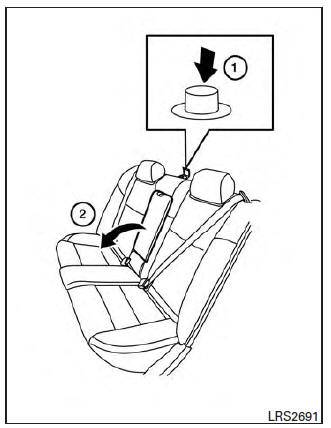
The trunk can be accessed from the passenger side of the rear seat for loading and unloading, as shown.
1. Move the front passenger seat to the most forward position.
2. Open the access cover on the rear parcel shelf.
3. Push down on the button 1 on the rear parcel shelf.
4. Fold down the passenger's side seatback 2 .
WARNING
- Never allow anyone to ride in the cargo area or on the rear seat when it is in the fold-down position. Use of these areas by passengers without proper restraints could result in serious injury or death in an accident or sudden stop.
- Properly secure all cargo with ropes or straps to help prevent it from sliding or shifting. Do not place cargo higher than the seatbacks. In a sudden stop or collision, unsecured cargo could cause personal injury.
- When returning the seatbacks to the
upright position, be certain they are
completely secured in the latched position.
If they are not completely secured, passengers may be injured in an accident or sudden stop.
- Closely supervise children when they
are around cars to prevent them from
playing and becoming locked in the
trunk where they could be seriously injured.
Keep the car locked, with the rear seatback and trunk lid securely latched when not in use, and prevent children's access to car keys.
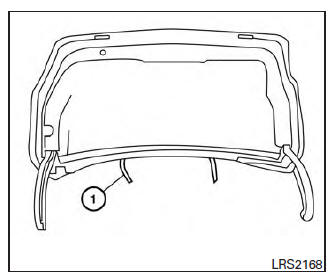
To fold down the driver side of the rear seat, open the trunk and pull on the strap 1 .
The rear seats can be locked using the mechanical key to prevent unauthorized access. For additional information on keys, refer to "Interior trunk access" in the "Pre-driving checks and adjustments" section of this manual.
Center armrest
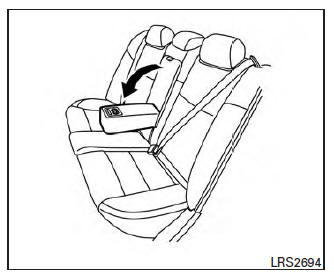
Pull the armrest down until it rests on the seat cushion.
 Front power seat adjustment
Operating tips
The power seat motor has an auto-reset
overload protection circuit. If the motor
stops during operation, wait 30 seconds
then reactivate the switch.
Do not operate the p ...
 Head restraints/headrests
WARNING
Head restraints/headrests supplement
the other vehicle safety systems. They may
provide additional protection against injury
in certain rear end collisions. Adjustable
head restraints/hea ...
Other materials:
B2630, B2631 sunload sensor
Description
COMPONENT DESCRIPTION
Sunload Sensor
The sunload sensor (1) is located on the driver side defroster
grille.
It detects sunload entering through windshield by means of a
photo diode. The sensor converts the sunload into a current value,
which is then input into the A/C auto ...
Precaution
Precaution for Supplemental Restraint System (SRS) "AIR BAG" and
"SEAT BELT PRE-TENSIONER"
The Supplemental Restraint System such as "AIR BAG" and "SEAT BELT
PRE-TENSIONER", used along with a front seat belt, helps to reduce the risk
or severity of injury to the driver and front passenger for ...
Center speaker
Removal and Installation
REMOVAL
Remove the center speaker grille, using a suitable tool.
Remove the center speaker screws (A).
Pull out the center speaker (1), disconnect the harness connector
from the center speaker and remove.
INSTALLATION
Installation is in the reverse order ...
Nissan Maxima Owners Manual
- Illustrated table of contents
- Safety-Seats, seat belts and supplemental restraint system
- Instruments and controls
- Pre-driving checks and adjustments
- Monitor, climate, audio, phone and voice recognition systems
- Starting and driving
- In case of emergency
- Appearance and care
- Do-it-yourself
- Maintenance and schedules
- Technical and consumer information
Nissan Maxima Service and Repair Manual

0.0071