
Nissan Maxima Service and Repair Manual: Horn function
Description
Perform answer-back for each operation with horn.
Component Function Check
1. CHECK FUNCTION
- Select HORN in "ACTIVE TEST" mode with CONSULT.
- Check the horn (high/low) operation.

Diagnosis Procedure
1. CHECK HORN FUNCTION
Check horn function with horn switch
2. CHECK HORN RELAY POWER SUPPLY
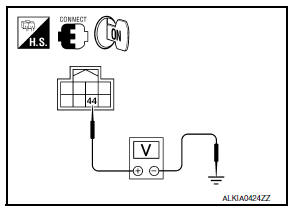
- Turn ignition switch ON.
- Perform "ACTIVE TEST" ("HORN") with CONSULT.
- Using an oscilloscope or analog voltmeter, check voltage between IPDM E/R connector and ground.

3. CHECK INTERMITTENT INCIDENT
 Key slot illumination
Description
Blinks when Intelligent Key insertion is required.
Component Function Check
1. CHECK FUNCTION
With CONSULT
Check key slot illumination KEY SLOT ILLUMI in Active Test mode.
Diagnosi ...
 Combination meter display function
Description
Displays each operation method guide and warning for system malfunction.
Component Function Check
1. CHECK FUNCTION
With CONSULT
Check the operation with ("LCD") in the Active Test. ...
Other materials:
Service data and specifications (SDS)
Steering Wheel
Steering Angle
Steering Column
STEERING COLUMN LENGTH
STEERING COLUMN ROTATING TORQUE
TILT MECHANISM OPERATING RANGE
Steering Gear
STEERING OUTER SOCKET AND INNER SOCKET
RACK STROKE
RACK SLIDING FORCE
Oil Pump
Steering Fluid
...
Trunk opener request switch
Description
Performs trunk lid open request when it is pressed.
Component Function Check
1. CHECK FUNCTION
With CONSULT
Check trunk opener request switch REQ SW -BD/TR in Data Monitor mode.
Diagnosis Procedure
1. CHECK TRUNK OPENER REQUEST SWITCH OUTPUT SIGNAL
Turn ignition switch ...
DLC branch line circuit
Diagnosis Procedure
1.CHECK CONNECTOR
Turn the ignition switch OFF.
Disconnect the battery cable from the negative terminal.
Check the terminals and connectors of the data link connector for
damage, bend and loose connection
(connector side and harness side).
2.CHECK HARNESS FOR OP ...
Nissan Maxima Owners Manual
- Illustrated table of contents
- Safety-Seats, seat belts and supplemental restraint system
- Instruments and controls
- Pre-driving checks and adjustments
- Monitor, climate, audio, phone and voice recognition systems
- Starting and driving
- In case of emergency
- Appearance and care
- Do-it-yourself
- Maintenance and schedules
- Technical and consumer information
Nissan Maxima Service and Repair Manual

0.0175