
Nissan Maxima Service and Repair Manual: Warning function symptoms
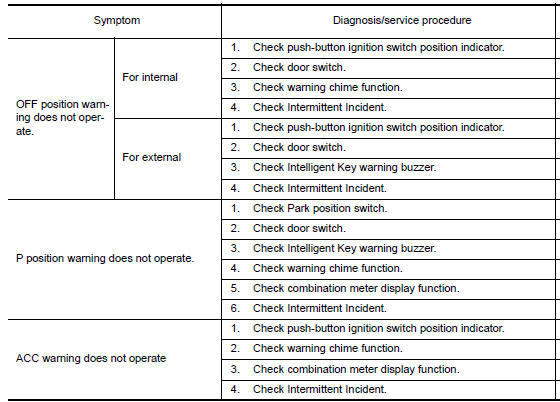
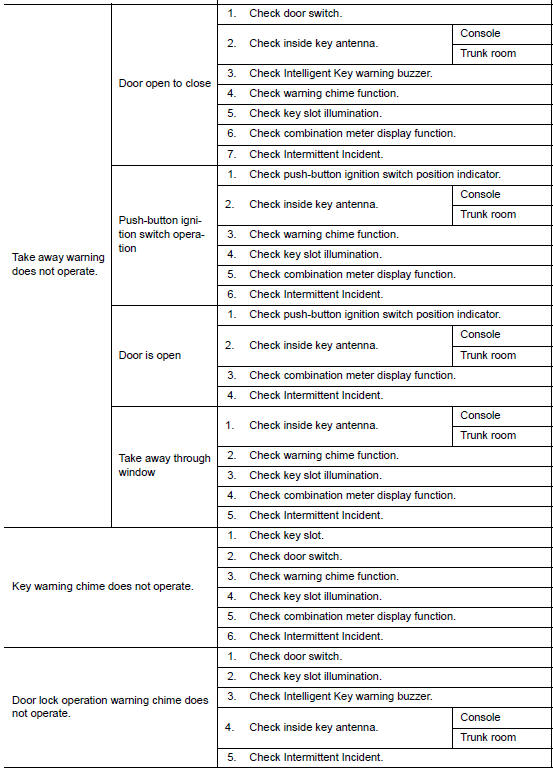
Symptom Table
WARNING FUNCTION MALFUNCTION
NOTE:
- Before performing the diagnosis in the following table, check "WORK FLOW". Refer to DLK-9, "Work Flow".
- Check that vehicle is under the condition shown in "Conditions of vehicle" before starting diagnosis, and check each symptom.
- If the following symptoms are detected, check systems shown in the "Diagnosis/service procedure" column in this order.
Conditions of Vehicle (Operating Conditions)
Warning chime functions operating condition is extremely complicated. During operating confirmations, reconfirm the list above twice in order to ensure proper operation.
 Trunk open function symptoms
TRUNK LID OPENER SWITCH
TRUNK LID OPENER SWITCH : Symptom Table
TRUNK OPEN FUNCTION MALFUNCTION
NOTE:
Before performing the diagnosis in the following table, check
"WORK FLOW". Refer to DLK- ...
 Key reminder function symptoms
Symptom Table
KEY REMINDER FUNCTION MALFUNCTION
NOTE:
Before performing the diagnosis in the following table, check
"Work flow". Refer to DLK-9, "Work Flow".
If the following sym ...
Other materials:
P1553 battery current sensor
Description
The power generation voltage variable control enables fuel consumption to be
decreased by reducing the
engine load which is caused by the power generation of the generator. The
battery current sensor is installed
to the battery cable at the negative terminal. The sensor measures ...
EVAP control system pressure sensor
Removal and Installation
REMOVAL
Remove rear stabilizer bar clamps and position rear stabilizer bar
aside. Refer to RSU-13, "Removal and Installation".
Disconnect EVAP hose from EVAP canister.
Disconnect EVAP control system pressure sensor.
Remove EVAP control s ...
AV control unit
Reference Value
VALUES ON THE DIAGNOSIS TOOL
CONSULT data monitor item
TERMINAL LAYOUT
PHYSICAL VALUES
DTC Index
SELF-DIAGNOSIS RESULTS DISPLAY ITEM
...
Nissan Maxima Owners Manual
- Illustrated table of contents
- Safety-Seats, seat belts and supplemental restraint system
- Instruments and controls
- Pre-driving checks and adjustments
- Monitor, climate, audio, phone and voice recognition systems
- Starting and driving
- In case of emergency
- Appearance and care
- Do-it-yourself
- Maintenance and schedules
- Technical and consumer information
Nissan Maxima Service and Repair Manual

0.0104