
Nissan Maxima Service and Repair Manual: B2555 stop lamp
Description
BCM detects the stop lamp status and confirms the stop lamp switch ON/OFF status. BCM confirms the engine start condition according to the stop lamp switch ON/OFF status.
DTC Logic
DTC DETECTION LOGIC

DTC CONFIRMATION PROCEDURE
1.PERFORM DTC CONFIRMATION PROCEDURE
-
Depress the brake pedal and wait for at least 1 second.
-
Check "Self Diagnostic Result" with CONSULT.
Diagnosis Procedure
Regarding Wiring Diagram information, refer to SEC-147, "Wiring Diagram" or SEC-128, "Wiring Diagram".
1.CHECK STOP LAMP SWITCH INPUT SIGNAL
-
Turn ignition switch OFF.
-
Disconnect BCM harness connector.
-
Check voltage between BCM harness connector M18 terminal 26 and ground.
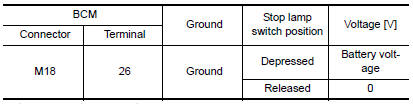
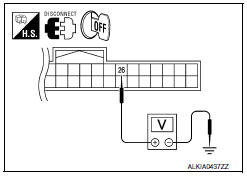
2.CHECK STOP LAMP SWITCH POWER SUPPLY CIRCUIT
-
Disconnect stop lamp switch harness connector.
-
Check voltage between stop lamp harness connector E38 terminal 3 and ground.

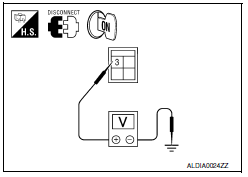
3.CHECK STOP LAMP SWITCH CIRCUIT
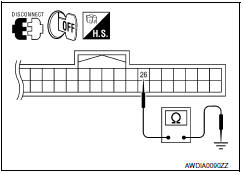
1. Check continuity between stop lamp switch harness connector E38 (A) terminal 4 and BCM harness connector M18 (B) terminal 26.

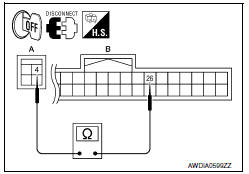
2. Check continuity between BCM harness connector M18 terminal 26 and ground.

4.CHECK STOP LAMP SWITCH
Refer to SEC-44, "Component Inspection".
5.CHECK INTERMITTENT INCIDENT
Refer to GI-41, "Intermittent Incident".
Inspection End.
Component Inspection
1.CHECK STOP LAMP SWITCH
-
Turn ignition switch OFF.
-
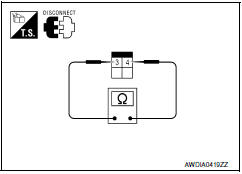
Disconnect stop lamp switch harness connector.
-
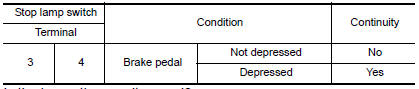
Check continuity between stop lamp switch terminals under the following conditions.
 B2193 chain of ECM-IMMU
Description
BCM performs the ID verification with ECM that allows the
engine to start. Start the engine if the ID is OK.
ECM prevents the engine from starting if the ID is not registered. BCM st ...
 B2556 push-button ignition switch
Description
The switch that changes the power supply position. BCM
maintains the power supply position status. BCM
changes the power supply position with the operation of the push-button ignition ...
Other materials:
Electric ignition system
System Diagram
System Description
INPUT/OUTPUT SIGNAL CHART
*1: This signal is sent to the ECM via the CAN communication line.
*2: ECM determines the start signal status by the signals of engine speed and
battery voltage.
SYSTEM DESCRIPTION
Ignition order: 1 - 2 - 3 - 4 - 5 - 6
The ...
Ignition signal
Description
The ignition signal from the ECM is sent to and amplified by the power
transistor. The power transistor turns
ON and OFF the ignition coil primary circuit. This ON/OFF operation induces the
proper high voltage in the coil
secondary circuit.
Component Function Check
1.INSPECTIO ...
Front door speaker
Description
The AV control unit sends audio signals to the front door speakers using the
front door speaker circuits.
Diagnosis Procedure
1.CONNECTOR CHECK
Check the AV control unit and speaker connectors for the following:
Proper connection
Damage
Disconnected or loose terminals
2. ...
Nissan Maxima Owners Manual
- Illustrated table of contents
- Safety-Seats, seat belts and supplemental restraint system
- Instruments and controls
- Pre-driving checks and adjustments
- Monitor, climate, audio, phone and voice recognition systems
- Starting and driving
- In case of emergency
- Appearance and care
- Do-it-yourself
- Maintenance and schedules
- Technical and consumer information
Nissan Maxima Service and Repair Manual

0.0096