
Nissan Maxima Service and Repair Manual: B2604 transmission range switch
Description
BCM confirms the shift position with the following 4 signals.
-
CVT selector lever
-
Transmission range switch
-
P position signal from IPDM E/R (CAN)
-
P position signal from TCM (CAN)
DTC Logic
DTC DETECTION LOGIC
NOTE:
-
If DTC B2604 is displayed with DTC U1000, first perform the trouble diagnosis for DTC U1000. Refer to SEC-29, "DTC Logic".
-
If DTC B2604 is displayed with DTC U1010, first perform the trouble diagnosis for DTC U1010. Refer to SEC-30, "DTC Logic".
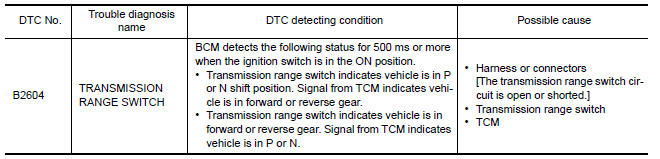
DTC CONFIRMATION PROCEDURE
1.PERFORM DTC CONFIRMATION PROCEDURE
-
Start the engine under the following conditions and wait for at least 1 second.
-
CVT selector lever is in the P position
-
Do not depress the brake pedal
-
-
Use CVT selector lever to select each gear one at a time. Wait at each gear for at least 1 second.
-
Check "Self diagnostic result" with CONSULT.
Diagnosis Procedure
Regarding Wiring Diagram information, refer to SEC-147, "Wiring Diagram" or SEC-128, "Wiring Diagram".
1.CHECK DTC WITH TCM
Check "Self diagnostic result" with CONSULT. Refer to PCS-27, "DTC Index".
2.CHECK TRANSMISSION RANGE SWITCH CIRCUIT
-
Turn ignition switch OFF.
-
Disconnect TCM harness connector and BCM harness connector.
-
Check continuity between TCM harness connector F15 (A) terminal 20 and BCM harness connector M18 (B) terminal 48.

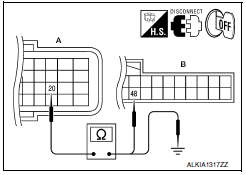
4. Check continuity between TCM harness connector F15 (A) terminal 20 and ground.

3.CHECK INTERMITTENT INCIDENT
Refer to GI-41, "Intermittent Incident".
Inspection End.
 B2603 shift position status
Description
BCM confirms the shift position with the following 2
signals.
CVT selector lever
P/N position switch
DTC Logic
DTC DETECTION LOGIC
NOTE:
If DTC ...
 B2605 transmission range switch
Description
BCM confirms the shift position with the following 4
signals.
CVT selector lever
Transmission range switch
P position signal from IPDM E/R (CAN) ...
Other materials:
Remove
Use the following procedure to remove the head
restraint/headrest:
1. Pull the head restraint/headrest up to the
highest position.
2. Push and hold the lock knob.
3. Remove the head restraint/headrest from
the seat.
4. Store the head restraint/headrest properly in
a secure place so i ...
U1255 satellite radio tuner
Description
DTC Logic
Diagnosis Procedure
1.CHECK SATELLITE RADIO TUNER POWER SUPPLY AND GROUND CIRCUIT
Check satellite radio tuner power supply and ground circuit.
2.CHECK CONTINUITY COMMUNICATION CIRCUIT AND REQUEST SIGNAL CIRCUIT
Turn ignition switch OFF.
Disconnect AV cont ...
Heater & cooling unit assembly
Exploded View
Wiring harness
Mode door motor
Upper floor connecting duct (LH)
Air mix door motor (driver side)
Heater core pipes cover
Heater core
In-cabin microfilter
Filter cover
Blower motor
Intake door motor
Blower unit
Upper floor connecting duct (RH)
Air mi ...
Nissan Maxima Owners Manual
- Illustrated table of contents
- Safety-Seats, seat belts and supplemental restraint system
- Instruments and controls
- Pre-driving checks and adjustments
- Monitor, climate, audio, phone and voice recognition systems
- Starting and driving
- In case of emergency
- Appearance and care
- Do-it-yourself
- Maintenance and schedules
- Technical and consumer information
Nissan Maxima Service and Repair Manual

0.0359