
Nissan Maxima Service and Repair Manual: B210F transmission range switch
Description
IPDM E/R confirms the shift position with the following signals.
-
Transmission range switch
-
Shift position signal from BCM (CAN)
DTC Logic
DTC DETECTION LOGIC
NOTE:
-
If DTC B210F is displayed with DTC U1000, first perform the trouble diagnosis for DTC U1000. Refer to SEC-29, "DTC Logic"
-
If DTC B210F is displayed with DTC U1010, first perform the trouble diagnosis for DTC U1010. Refer to SEC-30, "DTC Logic".

DTC CONFIRMATION PROCEDURE
1.PERFORM DTC CONFIRMATION PROCEDURE
-
Turn ignition switch ON under the following conditions and wait for at least 1 second.
-
CVT selector lever is in the P or N position
-
Do not depress the brake pedal
-
-
Check "Self diagnostic result" with CONSULT.
Diagnosis Procedure
Regarding Wiring Diagram information, refer to SEC-147, "Wiring Diagram" or SEC-128, "Wiring Diagram".
1.CHECK DTC WITH BCM
Refer to BCS-64, "DTC Index".
2.CHECK TRANSMISSION RANGE SWITCH INPUT SIGNAL
-
Turn ignition switch OFF.
-
Disconnect IPDM E/R harness connector.
-
Turn ignition switch ON.
-
Check voltage between IPDM E/R harness connector E18 terminal 30 and ground under following condition.
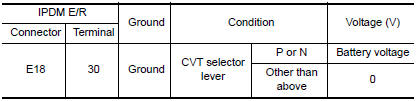
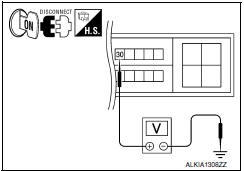
3.CHECK TRANSMISSION RANGE SWITCH CIRCUIT
-
Turn ignition switch OFF.
-
Disconnect TCM harness connector.
-
Check continuity between IPDM E/R harness connector E18 (B) terminal 72 and TCM harness connector F15 (A) terminal 20.

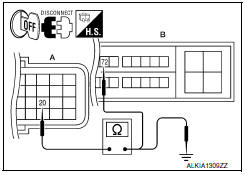
4. Check continuity between TCM harness connector F15 (A) terminal 20 and ground.

4.CHECK INTERMITTENT INCIDENT
Refer to GI-41, "Intermittent Incident".
Inspection End.
 B210E starter relay
DTC Logic
DTC DETECTION LOGIC
NOTE:
If DTC B210E is displayed with DTC
U1000, first perform the trouble diagnosis for DTC U1000. Refer to
SEC-29, "DTC Logic".
If DTC B210E is di ...
 B2110 transmission range switch
Description
IPDM E/R confirms the shift position with the following
signals.
Transmission range switch
Shift position signal from BCM (CAN)
DTC Logic
DTC DETECTION ...
Other materials:
Squeak and rattle trouble diagnoses
Work Flow
CUSTOMER INTERVIEW
Interview the customer if possible, to determine the conditions that exist
when the noise occurs. Use the Diagnostic Worksheet during the interview to
document the facts and conditions when the noise occurs and any customer's
comments; refer to RF-144, "Diagnos ...
STRG branch line circuit
Diagnosis Procedure
1.CHECK CONNECTOR
Turn the ignition switch OFF.
Disconnect the battery cable from the negative terminal.
Check the terminals and connectors of the steering angle sensor
for damage, bend and loose connection
(unit side and connector side).
2.CHECK HARNESS FOR OPE ...
Checking tire pressure
1. Remove the valve stem cap from the
tire.
2. Press the pressure gauge squarely
onto the valve stem. Do not press too
hard or force the valve stem sideways,
or air will escape. If the hissing
sound of air escaping from the tire is
heard while checking the pressure,
reposition the gaug ...
Nissan Maxima Owners Manual
- Illustrated table of contents
- Safety-Seats, seat belts and supplemental restraint system
- Instruments and controls
- Pre-driving checks and adjustments
- Monitor, climate, audio, phone and voice recognition systems
- Starting and driving
- In case of emergency
- Appearance and care
- Do-it-yourself
- Maintenance and schedules
- Technical and consumer information
Nissan Maxima Service and Repair Manual

0.0074