
Nissan Maxima Owners Manual: Adjustable head restraint/headrest components
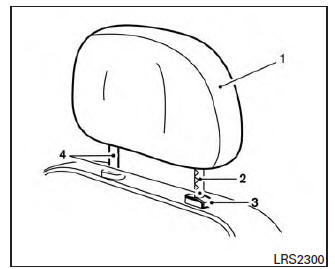
1. Removable head restraint/headrest
2. Multiple notches
3. Lock knob
4. Stalks
Non-adjustable head restraint/headrest components
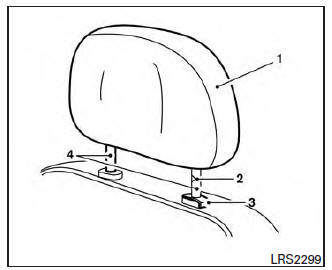
1. Removable head restraint/headrest
2. Single notch
3. Lock knob
4. Stalks
 Head restraints/headrests
WARNING
Head restraints/headrests supplement
the other vehicle safety systems. They may
provide additional protection against injury
in certain rear end collisions. Adjustable
head restraints/hea ...
 Remove
Use the following procedure to remove the head
restraint/headrest:
1. Pull the head restraint/headrest up to the
highest position.
2. Push and hold the lock knob.
3. Remove the head restrai ...
Other materials:
P0778 pressure control solenoid B
Description
The secondary pressure solenoid valve regulates the oil pump discharge
pressure to suit the driving condition
in response to a signal sent from the TCM.
DTC Logic
DTC DETECTION LOGIC
DTC CONFIRMATION PROCEDURE
CAUTION:
Always drive vehicle at a safe speed.
NOTE:
Immediate ...
Normal operating condition
Description
XENON HEADLAMP
The brightness and color of the light may vary slightly immediately
after turning the headlamp ON. This condition will remain until the xenon
bulb becomes stable. This is normal.
Illumination time lag may occur between right and left. This is
normal.
AUT ...
Preparation
PREPARATION
Special Service Tool
The actual shape of the tools may differ from those illustrated here.
Commercial Service Tools
...
Nissan Maxima Owners Manual
- Illustrated table of contents
- Safety-Seats, seat belts and supplemental restraint system
- Instruments and controls
- Pre-driving checks and adjustments
- Monitor, climate, audio, phone and voice recognition systems
- Starting and driving
- In case of emergency
- Appearance and care
- Do-it-yourself
- Maintenance and schedules
- Technical and consumer information
Nissan Maxima Service and Repair Manual

0.013