
Nissan Maxima Owners Manual: Remove
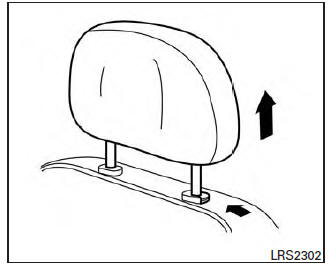
Use the following procedure to remove the head restraint/headrest: 1. Pull the head restraint/headrest up to the highest position.
2. Push and hold the lock knob.
3. Remove the head restraint/headrest from the seat.
4. Store the head restraint/headrest properly in a secure place so it is not loose in the vehicle.
5. Reinstall and properly adjust the head restraint/headrest before an occupant uses the seating position.
 Adjustable head restraint/headrest components
1. Removable head restraint/headrest
2. Multiple notches
3. Lock knob
4. Stalks
Non-adjustable head restraint/headrest components
1. Removable head restraint/headrest
2. Single notch
3 ...
 Install
1. Align the head restraint/headrest stalks with
the holes in the seat. Make sure that the
head restraint/headrest is facing the correct
direction. The stalk with the notch (notches)
1 must be i ...
Other materials:
Manual function
MANUAL FUNCTION : System Diagram
MANUAL FUNCTION : System Descriptio
OUTLINE
The driving position (seat, steering column and door mirror position) can be
adjusted manually with power seat switch, ADP steering switch and door mirror
remote control switch.
OPERATION PROCEDURE
Turn igni ...
RGB synchronizing signal circuit
Description
Transmit the RGB synchronizing signal to the display unit so as to
synchronize the RGB image displayed with AV control unit.
Diagnosis Procedure
1.CHECK CONTINUITY RGB SYNCHRONIZING SIGNAL CIRCUIT
Turn ignition switch OFF.
Disconnect display unit connector M141 and AV con ...
Precaution
Precaution for Supplemental Restraint System (SRS) "AIR BAG" and
"SEAT BELT PRE-TENSIONER
The Supplemental Restraint System such as "AIR BAG" and "SEAT BELT
PRE-TENSIONER", used along with a front seat belt, helps to reduce the risk
or severity of injury to the driver and front passenger for ...
Nissan Maxima Owners Manual
- Illustrated table of contents
- Safety-Seats, seat belts and supplemental restraint system
- Instruments and controls
- Pre-driving checks and adjustments
- Monitor, climate, audio, phone and voice recognition systems
- Starting and driving
- In case of emergency
- Appearance and care
- Do-it-yourself
- Maintenance and schedules
- Technical and consumer information
Nissan Maxima Service and Repair Manual

0.0077