
Nissan Maxima Service and Repair Manual: Front fog lamp
System Diagram
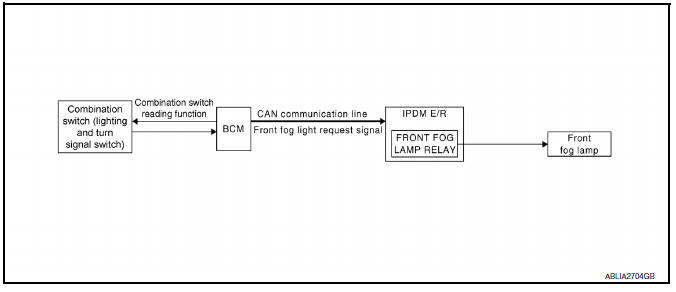
System Description
- BCM (Body Control Module) controls front fog lamp operation.
- IPDM E/R (Intelligent Power Distribution Module Engine Room) operates front fog lamp according to CAN communication signals from BCM.
- Combination meter operates front fog lamp indicator according to inputs via the CAN communication lines.
Component Parts Location
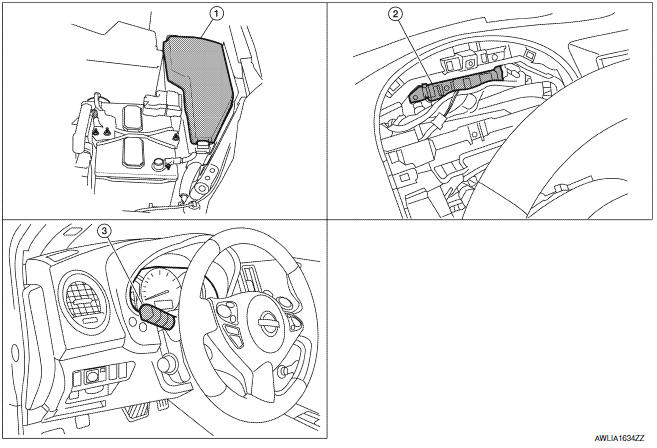
- IPDM E/R E17, E18, E200
- BCM M16, M17, M18, M19 (view with combination meter removed)
- Combination switch (lighting and turn signal switch) M28
Component Description
FRONT FOG LAMP OPERATION
When the lighting switch is in front fog lamp ON position and also in 1ST or 2ND position or AUTO position (headlamp is ON), the BCM detects FR FOG ON and the HEAD LAMP1, 2 ON or the AUTO LIGHT ON. The BCM sends a front fog lamp request ON signal through the CAN communication lines to the IPDM E/R. The IPDM E/R then turns ON the front fog lamp relay sending power to the front fog lamps.
The combination meter also receives a front fog lamp request ON signal through the CAN communication lines at which time it turns the front fog indicator ON.
 Auto light system
System Diagram
System Description
BCM (Body Control Module) controls auto light operation according to
signals from optical sensor, lighting switch and ignition switch.
IPDM E/R (Intellige ...
 Turn signal and hazard warning lamps
System Diagram
System Description
BCM (Body Control Module) controls turn signal lamp (RH and LH) and
hazard warning lamp operation.
Combination meter operates turn signal indicator (RH an ...
Other materials:
Cooling fan control
System Diagram
System Description
INPUT/OUTPUT SIGNAL CHART
*1: The ECM determines the start signal status by the signals of engine speed
and battery voltage.
*2: This signal is sent to ECM via the CAN communication line.
SYSTEM DESCRIPTION
The ECM controls the cooling fan correspon ...
Vehicle loading information
WARNING
It is extremely dangerous to ride
in a cargo area inside a vehicle. In
a collision, people riding in these
areas are more likely to be seriously
injured or killed.
Do not allow people to ride in any
area of your vehicle that is not
equipped with seats and seat
belts.
Be ...
Disassembly and assembly
FUEL LEVEL SENSOR UNIT
Disassembly and Assembly
Fuel Level Sensor Unit
Harness connectors
Fuel level sensor unit
Fuel tank temperature sensor
Float arm assembly
Disassembly
NOTE: Before disassembly, note the proper
placement of the wires to the correct terminals a ...
Nissan Maxima Owners Manual
- Illustrated table of contents
- Safety-Seats, seat belts and supplemental restraint system
- Instruments and controls
- Pre-driving checks and adjustments
- Monitor, climate, audio, phone and voice recognition systems
- Starting and driving
- In case of emergency
- Appearance and care
- Do-it-yourself
- Maintenance and schedules
- Technical and consumer information
Nissan Maxima Service and Repair Manual

0.0143