
Nissan Maxima Service and Repair Manual: Hazard switch
Exploded View
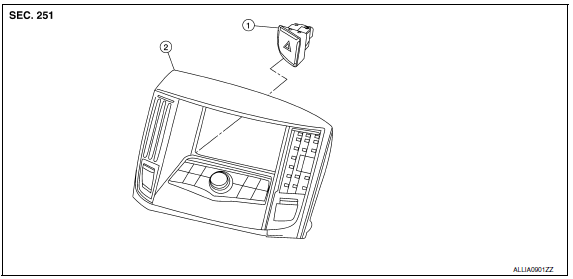
- Hazard switch
- Cluster lid D
Removal and Installation
REMOVAL
- Remove cluster lid D. Refer to IP-18, "Removal and Installation".
- Disconnect the harness connector from the hazard switch and remove.
INSTALLATION
Installation is in the reverse order of removal.
 Lighting & turn signal switch
Removal and Installation
NOTE: The lighting and turn signal switch is
integral with the combination switch assembly.
REMOVAL
Unlock steering wheel.
CAUTION:
Before servicing, disconnec ...
 Rear combination lamp
Exploded View
Slide clip
Grommets
Rear combination lamp
Removal and Installation
REAR COMBINATION LAMP
Removal
Remove the trunk side finisher. Refer to INT-36, "Removal and
...
Other materials:
Hazard switch
Exploded View
Hazard switch
Cluster lid D
Removal and Installation
REMOVAL
Remove cluster lid D. Refer to IP-18, "Removal and Installation".
Disconnect the harness connector from the hazard switch.
Remove the hazard switch.
INSTALLATION
Installation is in the reverse order o ...
B2636, B2637, B2638, B2639, B2654, B2655 mode door motor
Description
COMPONENT DESCRIPTION
Mode Door Motor
The mode door motor (1) is attached to the heater & cooling unit
assembly.
It rotates so that air is discharged from the outlet set by the
A/C
auto amp. Motor rotation is conveyed to a link which activates the
mode door.
D ...
Basic inspection
DIAGNOSIS AND REPAIR WORKFLOW
Work Flow
OVERALL SEQUENCE
DETAILED FLOW
1.INTERVIEW FOR MALFUNCTION
Find out what the customer's concerns are.
2.SYMPTOM CHECK
Verify the symptom from the customer's information.
3.BASIC INSPECTION
Check the operation of each part. Check that any concerns oc ...
Nissan Maxima Owners Manual
- Illustrated table of contents
- Safety-Seats, seat belts and supplemental restraint system
- Instruments and controls
- Pre-driving checks and adjustments
- Monitor, climate, audio, phone and voice recognition systems
- Starting and driving
- In case of emergency
- Appearance and care
- Do-it-yourself
- Maintenance and schedules
- Technical and consumer information
Nissan Maxima Service and Repair Manual

0.0215