
Nissan Maxima Service and Repair Manual: The oil pressure warning lamp does not turn off
Description
The oil pressure warning lamp remains illuminated while the engine is running (normal oil pressure).
Diagnosis Procedure
Regarding Wiring Diagram information, refer to MWI-87, "Wiring Diagram".
1.CHECK OIL PRESSURE WARNING LAMP
Perform IPDM E/R auto active test. Refer to PCS-11, "Diagnosis Description".
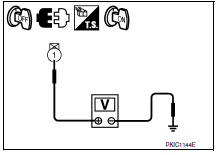
2.CHECK IPDM E/R OUTPUT VOLTAGE
-
Turn ignition switch OFF.
-
Disconnect the oil pressure switch connector.
-
Turn ignition switch ON.
-
Check voltage between the oil pressure switch harness connector F41 terminal 1 and ground.
3.CHECK OIL PRESSURE SWITCH
Perform a unit check for the oil pressure switch. Refer to MWI-42, "Component Inspection".
4.CHECK OIL PRESSURE SWITCH SIGNAL CIRCUIT
Check the oil pressure switch signal circuit. Refer to MWI-42, "Diagnosis Procedure".
 The oil pressure warning lamp does not turn on
Description
The oil pressure warning lamp stays off when the ignition
switch is turned ON.
Diagnosis Procedure
1.CHECK OIL PRESSURE WARNING LAMP
Perform IPDM E/R auto active test. Refer to PCS-1 ...
 The parking brake release warning continues displaying, or does not display
Description
The parking brake warning is displayed while
driving the vehicle even though the parking brake is released.
The parking brake warning is not displayed even
...
Other materials:
BCM branch line circuit
Diagnosis Procedure
1.CHECK CONNECTOR
Turn the ignition switch OFF.
Disconnect the battery cable from the negative terminal.
Check the terminals and connectors of the BCM for damage, bend and loose
connection (unit side and
connector side).
2.CHECK HARNESS FOR OPEN CIRCUIT
Disc ...
Body control system
System Description
OUTLINE
ECU DIAGNOSIS INFORMATION controls the various electrical
components. It inputs the information required to
the control from CAN communication and the signal received from each switch
and sensor.
BCM has combination switch reading function for reading the
...
ECM branch line circuit
Diagnosis Procedure
1.CHECK CONNECTOR
Turn the ignition switch OFF.
Disconnect the battery cable from the negative terminal.
Check the following terminals and connectors for damage, bend and
loose connection (unit side and connector
side).
- Models without automatic drive position ...
Nissan Maxima Owners Manual
- Illustrated table of contents
- Safety-Seats, seat belts and supplemental restraint system
- Instruments and controls
- Pre-driving checks and adjustments
- Monitor, climate, audio, phone and voice recognition systems
- Starting and driving
- In case of emergency
- Appearance and care
- Do-it-yourself
- Maintenance and schedules
- Technical and consumer information
Nissan Maxima Service and Repair Manual

0.0089