
Nissan Maxima Service and Repair Manual: Display unit
Reference Value
TERMINAL LAYOUT
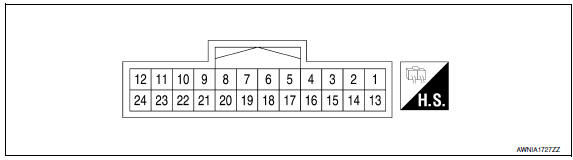
PHYSICAL VALUES
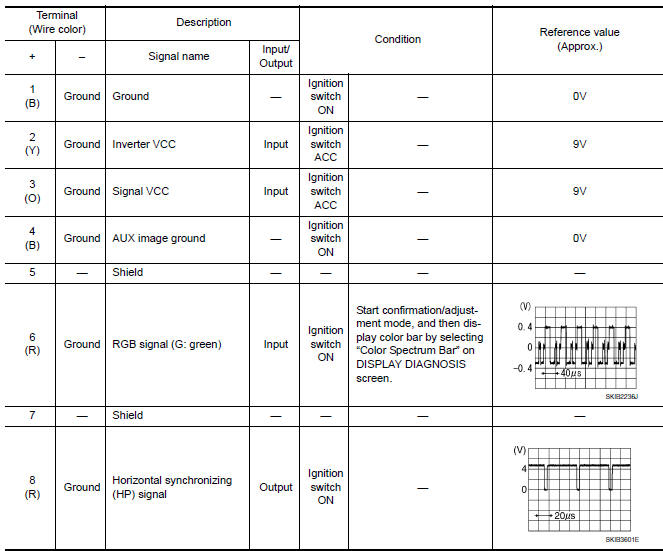
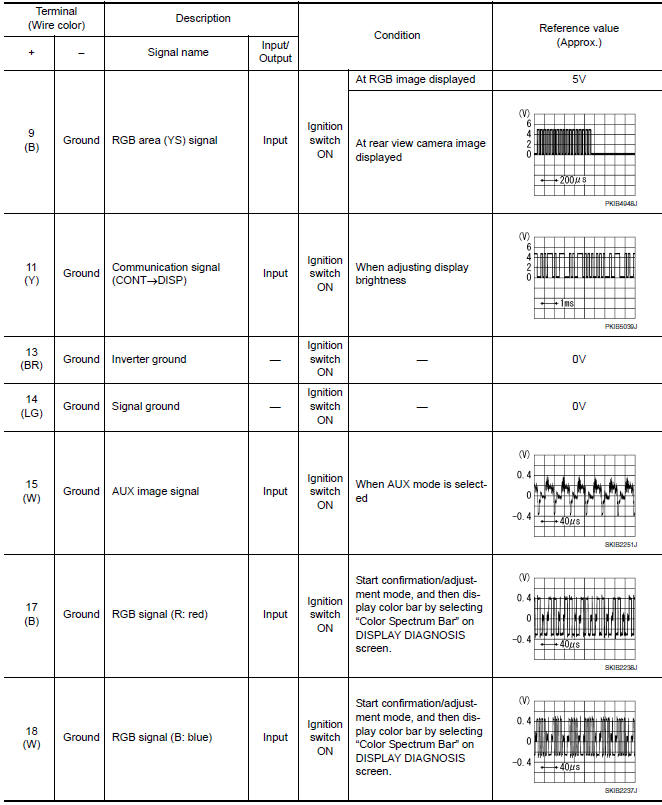
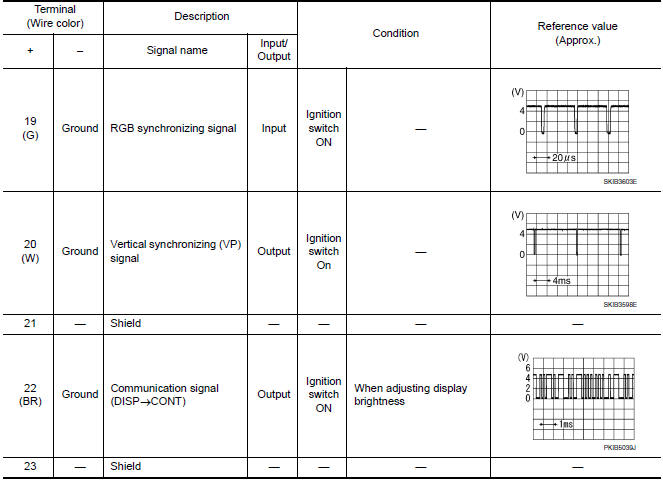
 AV control unit
Reference Value
VALUES ON THE DIAGNOSIS TOOL
CONSULT data monitor item
TERMINAL LAYOUT
PHYSICAL VALUES
*1 With satellite radio
DTC Index
Self-diagnosis results d ...
 Bose speaker amp
Reference Value
TERMINAL LAYOUT
PHYSICAL VALUES
...
Other materials:
Manual shift mode
The transmission enters the manual shift mode by
moving the shift lever to the left side in the "D"
range. You can select the manual shift range
either by moving the shift lever up or down, or by
pulling the right-side or left-side paddle shifter (if
so equipped). To cancel the manual shift ...
Precaution
Precaution for Supplemental Restraint System (SRS) "AIR BAG" and
"SEAT BELT PRE-TENSIONER"
The Supplemental Restraint System such as "AIR BAG" and "SEAT BELT
PRE-TENSIONER", used along with a front seat belt, helps to reduce the risk
or severity of injury to the driver and front passenger for ...
P0078, P0084 EVT control magnet retarder
Description
Exhaust valve timing control magnet retarder (1) controls the shut/
open timing of the exhaust valve by ON/OFF pulse duty signals sent
from the ECM.
The longer pulse width retards valve timing.
The shorter pulse width advances valve timing.
DTC Logic
DTC DETECTION LOGIC
...
Nissan Maxima Owners Manual
- Illustrated table of contents
- Safety-Seats, seat belts and supplemental restraint system
- Instruments and controls
- Pre-driving checks and adjustments
- Monitor, climate, audio, phone and voice recognition systems
- Starting and driving
- In case of emergency
- Appearance and care
- Do-it-yourself
- Maintenance and schedules
- Technical and consumer information
Nissan Maxima Service and Repair Manual

0.007