
Nissan Maxima Owners Manual: System maintenance
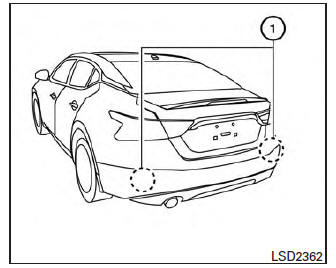
The two radar sensors 1 for the BSW and RCTA systems are located near the rear bumper.
Always keep the area near the radar sensors clean.
The radar sensors may be blocked by temporary ambient conditions such as splashing water, mist or fog.
The blocked condition may also be caused by objects such as ice, frost or dirt obstructing the radar sensors.
Check for and remove objects obstructing the area around the radar sensors.
Do not attach stickers (including transparent material), install accessories or apply additional paint near the radar sensors.
Do not strike or damage the area around the radar sensors. It is recommended that you visit a NISSAN dealer if the area around the radar sensors is damaged due to a collision.
Radio frequency statement
For USA
FCC : OAYSRR2B
This device complies with part 15 of the FCC Rules. Operation is subject to the following two conditions: (1) This device may not cause harmful interference, and (2) this device must accept any interference received, including interference that may cause undesired operation.
FCC Warning
Changes or modifications not expressly approved by the party responsible for compliance could void the user's authority to operate the equipment
For Canada
Applicable law: Canada 310
This device complies with Industry Canada licence-exempt RSS standard(s). Operation is subject to the following two conditions: (1) this device may not cause interference, and (2) this device must accept any interference, including interference that may cause undesired operation of the device.
Frequency bands: 24.05GHz - 24.25GHz
Output power: less than 20 milliwatts
 System temporarily unavailable
When radar blockage is detected, the system will
be deactivated automatically. The "Side Radar
Obstruction" warning message will appear and
the BSW/RCTA indicator (white) will blink A in
the v ...
 Rear Cross Traffic Alert (RCTA) (if so equipped)
WARNING
Failure to follow the warnings and instructions
for proper use of the RCTA system
could result in serious injury or death.
The RCTA system is not a replacement
for proper driving proc ...
Other materials:
VDC off indicator lamp
Description
Component Function Check
1.VDC OFF INDICATOR LAMP OPERATION CHECK 1
Check that the lamp illuminates for approximately 2 seconds after the
ignition switch is turned ON.
2.VDC OFF INDICATOR LAMP OPERATION CHECK 2
Check that the VDC OFF indicator lamp in the combination meter tur ...
Intake door control system
System Diagram
System Description
The intake doors are automatically controlled by the temperature setting,
ambient temperature, in-vehicle temperature,
intake temperature, amount of sunload and ON/OFF operation of the A/C
compressor.
SYSTEM OPERATION
The intake door control judges inta ...
Aluminum alloy wheels
Wash the wheels regularly with a sponge dampened
in a mild soap solution, especially during
winter months in areas where road salt is used. If
not removed, road salt can discolor the wheels.
CAUTION
Follow the directions below to avoid
staining or discoloring the wheels:
Do not use a clean ...
Nissan Maxima Owners Manual
- Illustrated table of contents
- Safety-Seats, seat belts and supplemental restraint system
- Instruments and controls
- Pre-driving checks and adjustments
- Monitor, climate, audio, phone and voice recognition systems
- Starting and driving
- In case of emergency
- Appearance and care
- Do-it-yourself
- Maintenance and schedules
- Technical and consumer information
Nissan Maxima Service and Repair Manual

0.0982