
Nissan Maxima Owners Manual: Blind Spot Warning (BSW) (if so equipped)
WARNING
Failure to follow the warnings and instructions for proper use of the BSW system could result in serious injury or death.
- The BSW system is not a replacement for proper driving procedures and is not designed to prevent contact with vehicles or objects. When changing lanes, always use the side and rear mirrors and turn and look in the direction your vehicle will move to ensure it is safe to change lanes. Never rely solely on the BSW system.
The BSW system helps alert the driver of other vehicles in adjacent lanes when changing lanes.
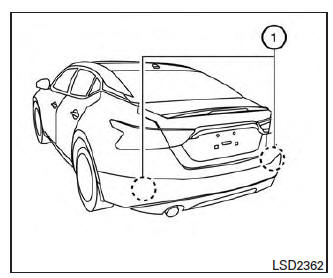
The BSW system uses radar sensors 1 installed near the rear bumper to detect other vehicles in an adjacent lane.
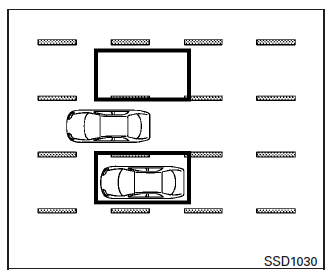
Detection zone
The radar sensors can detect vehicles on either side of your vehicle within the detection zone shown as illustrated. This detection zone starts from the outside mirror of your vehicle and extends approximately 10 ft (3.0 m) behind the rear bumper, and approximately 10 ft (3.0 m) sideways.
- BSW system operation
- How to enable/disable the BSW system
- BSW system limitations
- BSW driving situations
- System temporarily unavailable
- System maintenance
 Drive mode selector
Drive mode selector switches
Two driving modes can be selected by using the
drive mode selector switches, NORMAL and
SPORT.
NOTE:
When the drive mode select switch selects a
mode, the mo ...
 BSW system operation
1. Side BSW/RCTA Indicator Light
2. BSW/RCTA Indicator
The BSW system operates above approximately
20 mph (32km/h).
If the radar sensors detect a vehicle in the detection
zone, the side BSW ...
Other materials:
Mirror sensor
DRIVER SIDE
DRIVER SIDE : Description
The mirror sensor LH is installed to the door mirror LH.
The resistance of 2 sensors (horizontal and vertical) is changed
when the door mirror LH is operated.
Automatic drive positioner control unit calculates the door mirror
position according to ...
Low tire pressure warning lamp blinks
Low Tire Pressure Warning Lamp Flashes When Ignition Switch Is Turned
On
NOTE: If low tire pressure warning lamp flashes as
shown, the system is normal.
Flash Mode A
This mode shows transmitter status is OFF-mode.Carry out
transmitter wake up operation.
DIAGNOSTIC PROCEDURE ...
Bose speaker amp
Reference Value
TERMINAL LAYOUT
PHYSICAL VALUES
...
Nissan Maxima Owners Manual
- Illustrated table of contents
- Safety-Seats, seat belts and supplemental restraint system
- Instruments and controls
- Pre-driving checks and adjustments
- Monitor, climate, audio, phone and voice recognition systems
- Starting and driving
- In case of emergency
- Appearance and care
- Do-it-yourself
- Maintenance and schedules
- Technical and consumer information
Nissan Maxima Service and Repair Manual

0.0082