
Nissan Maxima Owners Manual: Turning the FEB system on/off
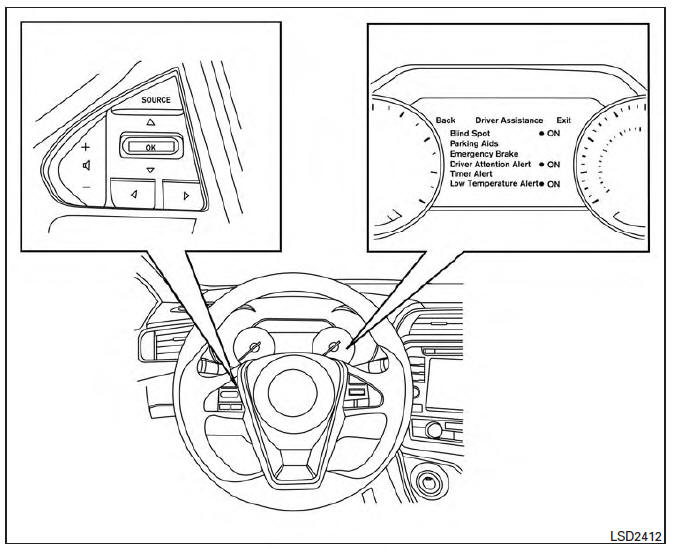
Perform the following steps to turn the FEB systems ON or OFF.
1. Press the  button until
"Settings" displays
in the vehicle information display and
then press OK button. Use the
button until
"Settings" displays
in the vehicle information display and
then press OK button. Use the button
to select "Driver Assistance". Then press the
OK button.
button
to select "Driver Assistance". Then press the
OK button.
2. Select "Emergency Brake" and press the OK button.
3. Select "System" and press the OK button.
When the FEB system is turned off, the FEB system warning light illuminates.
NOTE:
- The FEB system will be automatically turned on when the engine is restarted.
- The PFCW system (if so equipped) is integrated into the FEB system. There is not a separate selection in the vehicle information display for the PFCW system. When the FEB is turned off, the PFCW system is also turned off.
 FEB system operation
1. Vehicle ahead detection indicator
2. FEB warning indicator
3. FEB system warning light
The FEB system will function when your vehicle is
driven at speeds above approximately 3 mph
(5 km/h) ...
 FEB system limitations
WARNING
Listed below are the system limitations for
the FEB system. Failure to operate the
vehicle in accordance with these system
limitations could result in serious injury or
death.
The FEB sy ...
Other materials:
P1778 step motor
Description
The step motor changes the step by turning 4
coils ON/OFF according to the signal from TCM. As a result,
the flow of line pressure to primary pulley is changed and pulley ratio is
controlled.
This diagnosis item is detected when the
electrical syste ...
CAN communication circuit
Diagnosis Procedure
1.CONNECTOR INSPECTION
Turn the ignition switch OFF.
Disconnect the battery cable from the negative terminal.
Disconnect all the unit connectors on CAN communication system.
Check terminals and connectors for damage, bend and loose
connection.
2.CHECK HARNESS CON ...
Seat memory switch
Description
Seat memory switch is installed to the front door LH trim. The operation
signal is input to the driver seat control unit when the seat memory switch
is operated.
Component Function Check
1. CHECK FUNCTION
Select ""MEMORY SW 1", "MEMORY SW 2", "SET SW" in "DATA MONITOR"
mode ...
Nissan Maxima Owners Manual
- Illustrated table of contents
- Safety-Seats, seat belts and supplemental restraint system
- Instruments and controls
- Pre-driving checks and adjustments
- Monitor, climate, audio, phone and voice recognition systems
- Starting and driving
- In case of emergency
- Appearance and care
- Do-it-yourself
- Maintenance and schedules
- Technical and consumer information
Nissan Maxima Service and Repair Manual

0.0364