
Nissan Maxima Owners Manual: Passenger compartment
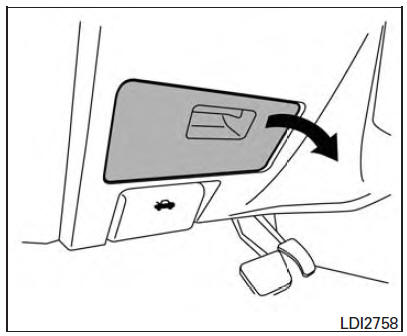
WARNING
Never use a fuse of a higher or lower amperage rating than specified on the fuse box cover. This could damage the electrical system or electronic control units or cause a fire.
If any electrical equipment does not operate, check for an open fuse.
1. Be sure the ignition switch and the headlight switch are in the OFF position.
2. Pull the fuse box cover to remove.
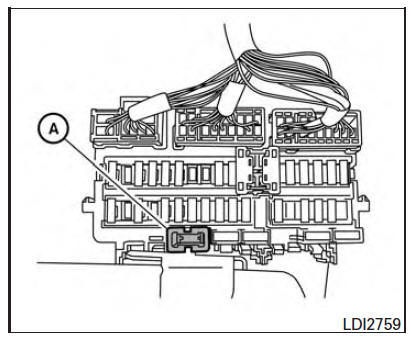
3. Remove the fuse with the fuse puller A .
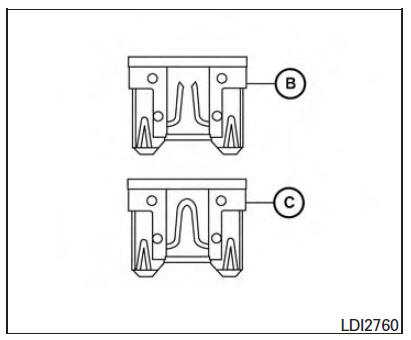
4. If the fuse is open B , replace it with an equivalent good fuse C .
5. Push the fuse box cover to install.
6. If a new fuse also opens, have the electrical system checked and repaired. It is recommended that you visit a NISSAN dealer for this service.
 Engine compartment
WARNING
Never use a fuse of a higher or lower
amperage rating than specified on the
fuse box cover. This could damage the
electrical system or electronic control
units or cause a fire.
If an ...
 Battery replacement
CAUTION
Be careful not to allow children to swallow
the battery or removed parts.
NISSAN Intelligent Key
Replace the battery in the Intelligent Key as follows:
1. Remove the mechanical key fr ...
Other materials:
Oil viscosity
The engine oil viscosity or thickness changes
with temperature. Because of this, it is important
to select the engine oil viscosity based on the
temperatures at which the vehicle will be operated
before the next oil change. Choosing an oil
viscosity other than that recommended could
cause seri ...
Selecting the correct oil
It is essential to choose the correct grade, quality
and viscosity engine oil to ensure satisfactory
engine life and performance. For additional information,
refer to "Recommended fluids/lubricants
and capacities" in this section. NISSAN recommends
the use of an energy conserving oil in
or ...
Diagnosis system (ipdm E/R)
Diagnosis Description
AUTO ACTIVE TEST
Description
In auto active test mode, the IPDM E/R sends a drive signal to the following
systems to check their operation.
Oil pressure warning lamp
Front wiper (LO, HI)
Parking lamps
Side marker lamps
License plate lamps
Tail lamps
Front f ...
Nissan Maxima Owners Manual
- Illustrated table of contents
- Safety-Seats, seat belts and supplemental restraint system
- Instruments and controls
- Pre-driving checks and adjustments
- Monitor, climate, audio, phone and voice recognition systems
- Starting and driving
- In case of emergency
- Appearance and care
- Do-it-yourself
- Maintenance and schedules
- Technical and consumer information
Nissan Maxima Service and Repair Manual

0.0152