
Nissan Maxima Service and Repair Manual: Shift lock system
System Diagram
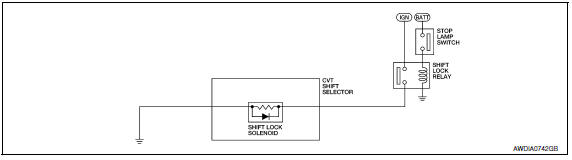
System Description
The selector lever cannot be shifted from "P" position to any other position unless the ignition switch is in the ON position and the brake pedal is depressed.
Component Parts Location
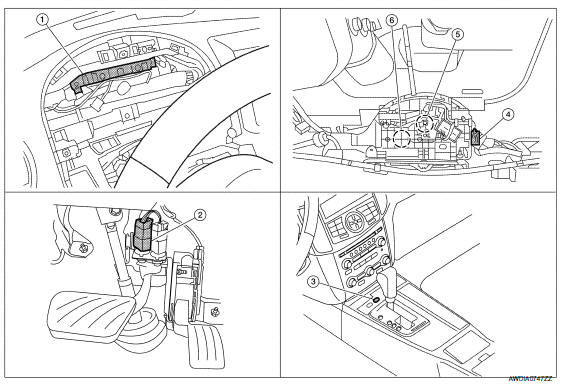
- BCM (view with combination meter removed)
- Stop lamp switch
- Shift lock release
- CVT shift selector connector
- Park position switch 6. Shift lock solenoid
Component Description
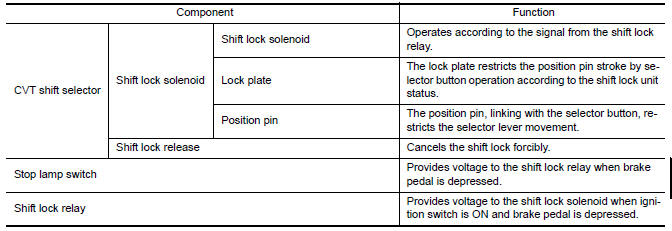
 Shift control system
System Diagram
NOTE: The gear ratio is set for each position separately.
System Description
In order to select the gear ratio that can obtain the driving force in
accordance with driver's inten ...
 On board diagnostic (OBD) system
Diagnosis Description
DESCRIPTION
The CVT system has two self-diagnostic systems.
The first is the emission-related on board diagnostic system (OBD-II) performed
by the TCM in combination
wit ...
Other materials:
Meter control switch
Removal and Installation
REMOVAL
Disconnect the negative battery terminal. Refer
to PG-67, "Removal and Installation (Battery)".
Remove the cluster lid A. Refer to IP-16,
"Removal and Installation".
Detach the combination meter control switch
harnes ...
Combination switch reading system
System Diagram
System Description
OUTLINE
BCM reads the status of the combination switch (light, turn
signal, wiper and washer) and recognizes the
status of each switch.
BCM has a combination of 5 output terminals (OUTPUT 1 - 5) and 5
input terminals (INPUT 1 - 5) and reads
a ...
CVT system
System Diagram
Component Parts Location
CVT shift selector assembly (Manual
mode select switch and manual
mode position select switch)
Secondary speed sensor
CVT unit harness connector
TCM
Accelerator pedal position (APP)
sensor
Stop ...
Nissan Maxima Owners Manual
- Illustrated table of contents
- Safety-Seats, seat belts and supplemental restraint system
- Instruments and controls
- Pre-driving checks and adjustments
- Monitor, climate, audio, phone and voice recognition systems
- Starting and driving
- In case of emergency
- Appearance and care
- Do-it-yourself
- Maintenance and schedules
- Technical and consumer information
Nissan Maxima Service and Repair Manual

0.0065