
Nissan Maxima Owners Manual: Instrument Panel
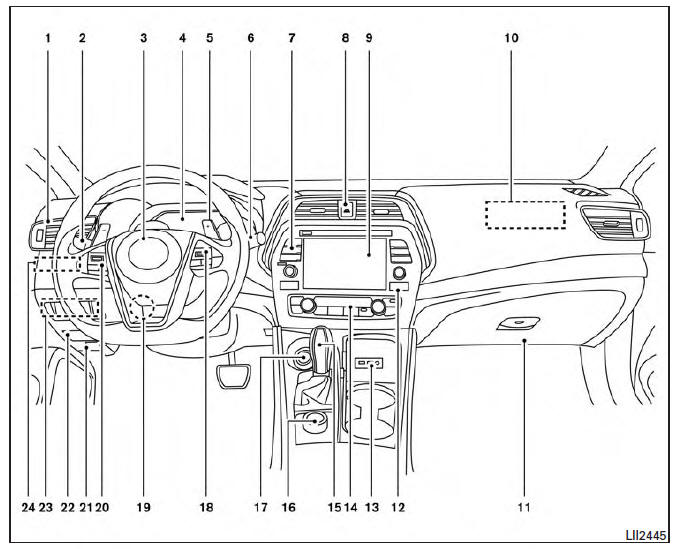
- Vent
- Headlight/fog light/turn signal switch
- Supplemental front-impact air bag. Horn
- Meters and gauges. Warning and indicator lights. Vehicle information display
- Paddle shifters (if so equipped)
- Wiper and washer switch
- Audio controls*. Navigation controls*
- Hazard warning flasher switch
- Navigation display*. Audio display*
- Front passenger supplemental air bag.
- Glove box
- Front passenger air bag status light
- AUX input/USB port*
- Heater and air conditioning controls
- Shift lever
- Display Commander*
- Push-button ignition switch
- Bluetooth Hands-Free Phone System. Cruise control switches (if so equipped). Intelligent Cruise Control . Intelligent Cruise Control
- Tilt and telescopic steering
- Audio control switches*. Vehicle information display control switches
- Hood release
- Fuse box
- Heated steering wheel switch (if so equipped). Vehicle Dynamic Control (VDC) OFF switch. Trunk release switch. Rear power sunshade switch (if so equipped)
- Instrument brightness control. Twin trip odometer reset switch
*: Refer to the separate Navigation System Owner's Manual.
Refer to the page number indicated in parentheses for operating details.
 Passenger compartment
Interior trunk access
Power moonroof (if so equipped)
Sun visors
Map lights
Rearview mirror. HomeLink Universal Transceiver
Glove box
Cup holders
Console box
Refer to the page ...
 Engine compartment check locations
VQ35DE engine
Engine coolant reservoir
Drive belt location
Engine oil filler cap
Brake fluid reservoir
Air cleaner
Fuse block
Fuse block/Fusible links
Fusible links
Battery
E ...
Other materials:
Door mirror motor
Description
It makes mirror face operate from side to side and up and down with the
electric power that automatic drive positioner control unit supplies.
Component Function Chec
1. CHECK DOOR MIRROR MOTOR FUNCTION
Check the operation with "MIRROR MOTOR RH" and "MIRROR MOTOR LH" in "ACTIVE
TE ...
Outside mirrors
The outside mirror remote control will operate
only when the ignition switch is in the ACC or ON
position.
Move the small switch 1 to select the right or left
mirror. Adjust each mirror to the desired position
using the large switch 2 .
WARNING
Objects viewed in the outside mirror on ...
Wiring diagram
SUNROOF SYSTEM
Wiring Diagram
...
Nissan Maxima Owners Manual
- Illustrated table of contents
- Safety-Seats, seat belts and supplemental restraint system
- Instruments and controls
- Pre-driving checks and adjustments
- Monitor, climate, audio, phone and voice recognition systems
- Starting and driving
- In case of emergency
- Appearance and care
- Do-it-yourself
- Maintenance and schedules
- Technical and consumer information
Nissan Maxima Service and Repair Manual

0.0067